Google Business Profile Without a Website: Run a 30-Field Audit
Test local Business Profile eligibility, ownership, operating facts, website purpose and customer actions with a 30-field downloadable audit.
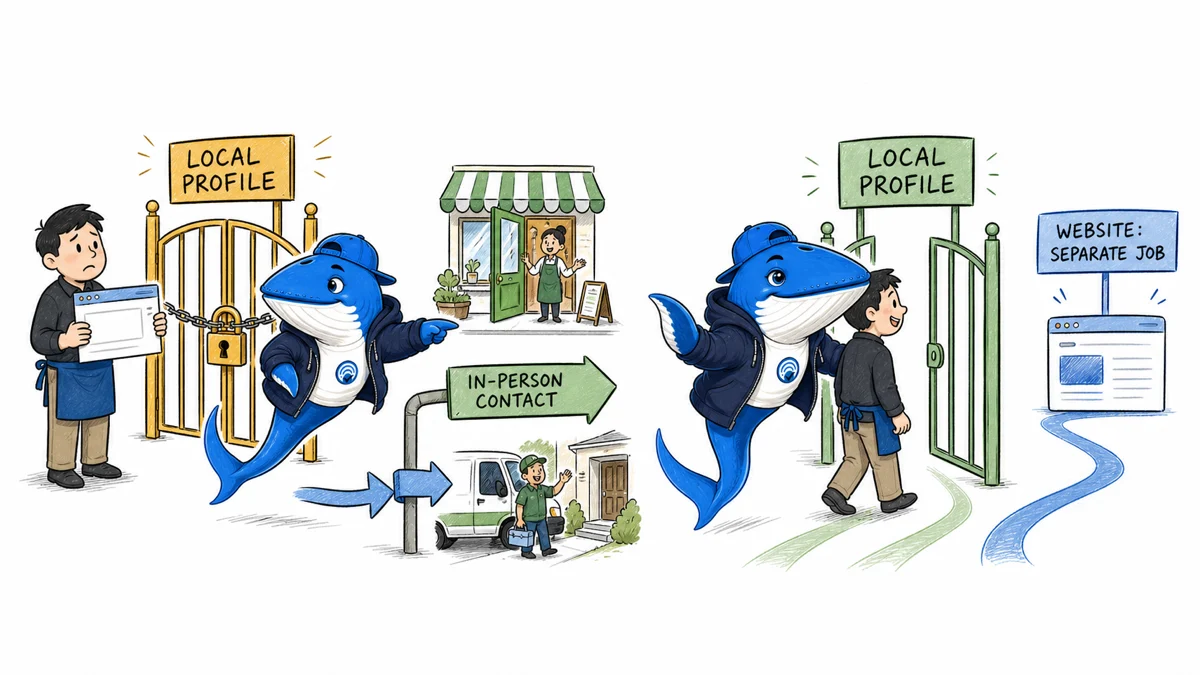
Direct answer: Google does not list a website as an eligibility requirement for a local Business Profile. Eligibility depends mainly on real in-person customer contact during stated hours, with documented exceptions. A website remains a separate customer-information, ownership, conversion, and measurement asset; having one does not make an online-only business eligible.
This rebuilt guide includes a 30-field Business Profile audit. Every sample row is marked EXAMPLE-REMOVE. Use it to record eligibility, ownership, business type, public facts, website state, profile interactions, and the decision supported by the evidence.
First separate a local Business Profile from a brand profile
Google’s current Business Profile and brand profile comparison describes two different products. A local Business Profile is for an eligible business that meets customers face to face at a fixed place or in a local service area. It can appear in Google Search and Maps for local discovery. A brand profile is an early-access Search surface for select ecommerce retailers.
An online-only retailer should not create a local presence by inventing a storefront, service area, or customer contact. It may qualify for a different merchant or brand surface, but that access has its own rules and availability. Record which product is being discussed before giving setup advice.
| Business state | Relevant profile | Website effect |
|---|---|---|
| Customers visit a staffed storefront | Local Business Profile may be eligible | Useful but not the eligibility test |
| Business visits customers locally | Service-area Business Profile may be eligible | Does not replace correct service-area setup |
| Online-only brand | Not eligible for a local Business Profile | A website does not create in-person contact |
| Select ecommerce retailer | Brand profile may be available by early access | Separate product and eligibility route |
Apply the in-person eligibility test before optimization
Google’s eligibility and ownership guidelines say an eligible business must make in-person contact with customers during stated hours. The page lists exceptions such as permitted kiosks, seasonal businesses with permanent signage, and some delivery-only food services. It also lists online-only businesses, lead-generation companies, unauthorized-location services, remote mailboxes, and certain other cases as ineligible.
Record the operating facts that exist outside Google: where the customer contact occurs, who is present, the stated hours, signage when relevant, licensing, invoices, and who owns or represents the business. Do not manufacture evidence for a profile. When the facts are unclear, pause creation and resolve the business model first.
Classify storefront, service-area, and hybrid businesses correctly
A storefront receives customers at its address. A service-area business goes to customers and should remove its address from the public profile. A hybrid business does both. Google’s service-area guidance allows up to 20 areas described by cities, postal codes, or similar regions; it says the overall boundary generally should not extend more than about two hours’ driving time from the base.
A rented mailing address, remote mailbox, or unstaffed virtual office is not a shortcut. A co-working location needs clear signage, customer reception during stated hours, and the business’s own staff during those hours if it is presented as a storefront. Use the profile type that matches reality and hide a residential or base address when customers are not served there.
| Field | What to preserve | Failure to avoid |
|---|---|---|
| Business name | Real-world signage, stationery, invoices, or established branding | Adding services, cities, or promotional keywords |
| Location type | Storefront, service-area, or hybrid operating evidence | Publishing a mailbox or unstaffed office |
| Category | The fewest specific categories that describe what the business is | Using categories as a service inventory |
| Owner | Business owner or expressly authorized representative | An agency claiming the profile without consent |
Decide whether a website solves a real customer job
A Business Profile can display hours, phone, location or service area, photos, reviews, services, products, and selected action links. A website can provide stable pages for detailed services, prices, policies, staff expertise, accessibility information, original evidence, legal disclosures, and conversion measurement. The two surfaces complement each other.
If no website exists, do not add an unrelated social page simply to make the field look complete. Google’s representative guidelines say a submitted website should be the single authoritative site for the business, be verifiable by the owner, and have content owned and managed by that owner. An authorized booking or order link can serve a narrower action, but it should not be presented as a fully controlled website.
Build a website when customers repeatedly need information the profile cannot present reliably, when the business needs a stable canonical source, or when first-party conversion measurement matters. Do not promise a local ranking gain merely because a URL was added.
Keep verification, ownership, accuracy, and visibility separate
Verification establishes a management relationship through a method Google supports for that business. It does not continually validate every fact on the public profile, guarantee approval of every edit, or promise appearance for a query. Owners still need a change-control routine for hours, phone, location, category, services, photos, public edits, reviews, and exceptional closures.
- Confirm that the business owner controls the profile or has granted explicit manager access.
- Preserve the verification state and date without storing sensitive verification material in the ledger.
- Compare profile fields with real operating records.
- Assign an owner for public edits, holiday hours, factual corrections, and review replies.
- Schedule a recheck after any relocation, ownership change, category change, or suspension event.
Measure profile interactions without inventing a ranking factor
Google’s Business Profile performance documentation says the report is available to verified profiles and may include views, searches, directions, call-button clicks, website-link clicks, messages, bookings, product views, menu interactions, and offers. Not every metric applies to every business.
Views use Google’s stated counting rules, calls count clicks on the call button rather than completed qualified calls, and website clicks require a website link. A no-website profile can legitimately show zero website clicks because there is no website action. That zero does not measure eligibility, local ranking, or unmet demand.
| Metric | Documented observation | Follow-up evidence |
|---|---|---|
| Views | People who viewed the profile under Google’s counting rules | Query, geography, season, and profile state |
| Calls | Clicks on the profile’s call button | Answered and qualified calls in first-party records |
| Directions | Direction requests after Google adjustments | Store visits or appointments if measured lawfully |
| Website clicks | Clicks on the profile website link | Landing sessions and declared outcomes |
The Google Ads versus Maps attribution checklist helps separate local lead sources. Use the small SEO experiment method when one controlled profile change needs an observation window.
Use the 30-field eligibility and customer-journey audit
Download the Business Profile without a website audit. Delete the rows labeled EXAMPLE-REMOVE and create one row for each business and review date. The fields cover authorization, business type, in-person contact, public address, service area, name evidence, category, phone, website ownership, action links, profile interactions, decision, owner, and next review.
Do not store IDs, video-verification footage, personal documents, customer records, or private access tokens in a shared editorial sheet. Link to a restricted evidence location when the reviewer needs proof, and record only the minimum status needed for the decision.
End with one bounded decision
Use keep profile without website when eligibility and operating facts are sound and the current customer journey is adequate. Use build an owned website when customers need stable detail, trust evidence, accessibility, policies, or first-party conversion paths. Use correct profile when real-world facts and public fields disagree. Use do not create or appeal yet when the business is online-only or cannot establish the required customer contact.
A website is not an eligibility loophole, and the absence of one is not proof of low quality. The correct decision starts with the business that exists, the customers it actually serves, and the information they need next.
Local visibility decision
A Business Profile can create demand without replacing a controlled website
A profile may be enough for discovery and contact in simple cases, but it leaves critical presentation and measurement decisions inside the platform.
- Use profile-only
- When the offer is simple, local and primarily call or direction driven.
- Add a website
- When services need explanation, comparison, conversion tracking or durable content.
- Measure
- Record calls, directions, messages and qualified outcomes, not profile views alone.
My takeaway: I treat a profile without a site as a deliberate operating model, not as a free substitute for owned infrastructure.
Sources and method
- Google: Business Profile and brand profile
- Google: business eligibility and ownership guidelines
- Google: guidelines for representing your business
- Google: manage service areas
- Google: Business Profile performance
- SearchEngineAnswer editorial policy
The official guidance was rechecked on August 29, 2026. This article provides a policy-and-measurement audit with illustrative rows. It does not verify a reader’s business, promise profile approval or visibility, reproduce confidential verification evidence, or claim that adding a website changes local rankings.
Keep learning
Continue this topic
Next in this topic
Seasonal SEO After the Event: Keep, Update, Redirect, or Remove?
Earlier in this topic
Yandex News RSS Feed Validation: A 22-Point Audit
SEO
Ask a question or join the discussion