Gemini Business Profile Changes: An Approval and Audit Workflow
Use Gemini with one eligible Google Business Profile through read, draft and change tiers, source-of-truth checks, approval records, public verification and rollback.
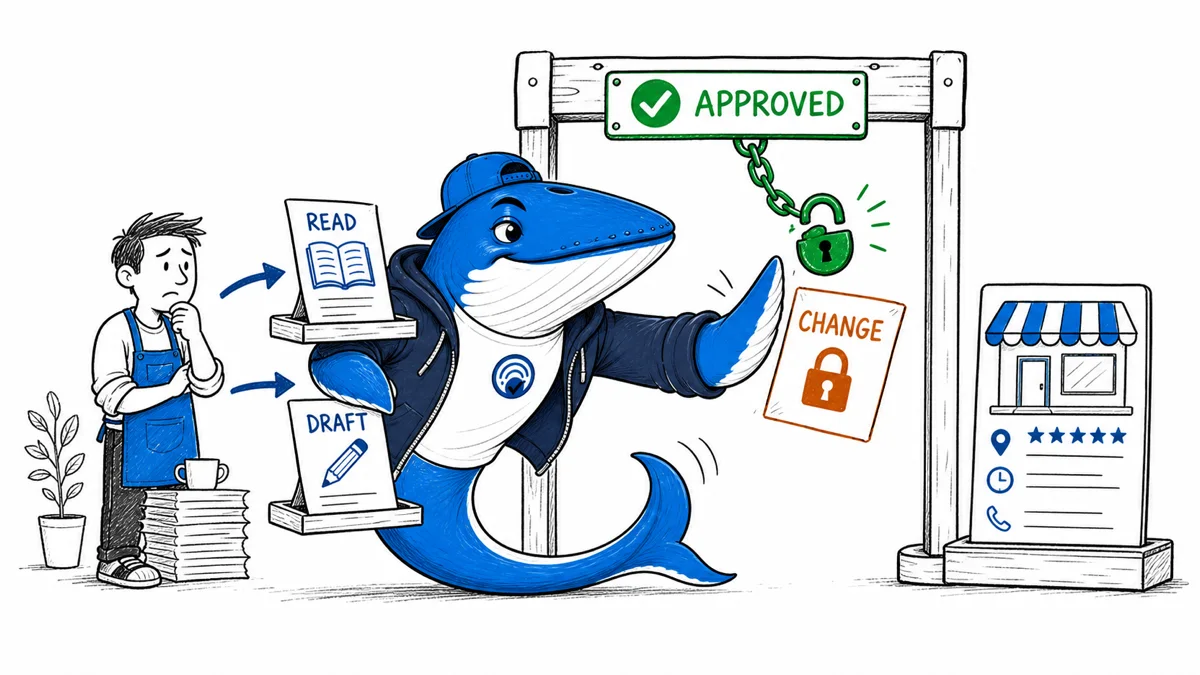
Direct answer: Use Gemini as a controlled interface to one eligible Google Business Profile, not as an autonomous profile manager. Google documents that the Gemini web app can review profile information, draft replies and posts, analyze feedback and performance, and perform supported updates. A named human should still approve customer-facing text and factual changes, then verify the public result in Search and Maps.
The connection does not create a ranking advantage, guarantee an edit will be accepted, or make generated claims accurate. This guide turns the documented feature into a practical approval and audit workflow. It does not report an original ranking experiment.
Check current eligibility first
Google says the connection is rolling out gradually. At the time of this review, an operator must be at least 18, use a personal Google Account associated with the profile, keep Gemini Apps Activity on, and own or manage only one verified Business Profile. Google also limits the feature to the Gemini web app and excludes the European Economic Area and United Kingdom. Supported languages and actions can change, so save the help-page access date with the operating procedure.
| Check | Current boundary | Workflow consequence |
|---|---|---|
| Account | Personal account associated with the profile | Do not design around a work or school login |
| Profile scope | Access to one verified profile | Keep multi-location operations outside this workflow |
| Surface | Gemini web app | Test the supported interface, not a mobile assumption |
| Activity | Keep Activity must be on | Review retention and access implications |
| Rollout | Gradual and region-limited | Maintain a manual fallback |
Inventory the supported actions
Google currently lists profile fields such as hours, contact information, action links, menus, media, attributes and location details. It also describes review access and reply drafting, Update, Offer and Event posts, performance metrics, and search keywords. Availability can vary by category and account. Build the runbook from the actions visible to the actual owner rather than copying a generic feature list.
Record whether each action is read-only, draft-only or capable of changing public state. The distinction is more useful than a single “Gemini access” permission because the risk of summarizing reviews is not the risk of publishing holiday hours.
Separate read, draft and change
| Level | Examples | Minimum control |
|---|---|---|
| Read | Summarize reviews or show performance | Confirm profile, period and metric definition |
| Draft | Propose a reply, description or post | Human edits and approval before publication |
| Change | Update hours, menu, URL or publish a post | Source-of-truth check, named approver and public verification |
| Delete | Remove media, menu item, reply or post | Explicit target confirmation and recovery plan |
Default new use cases to read or draft. Move an action to the change tier only after the team has tested the evidence source, confirmation behavior, audit trail and fallback.
Name a source of truth for every field
Before prompting, identify the authoritative record. Regular hours may come from the operating schedule; holiday hours from a signed manager notice; menu prices from the point-of-sale system; appointment links from the booking owner; accessibility attributes from a verified facilities review. A previous profile value or a generated guess is not automatically authoritative.
If evidence is missing or contradictory, stop the change and assign the question. Do not ask Gemini to infer a holiday closure, service area, wheelchair access, inventory level or promotional price from surrounding context.
Write a bounded change request
- Name the exact business and field.
- State whether the task is read, draft, change or delete.
- Supply the approved source and its effective date.
- Ask to show the proposed value before execution when the interface permits it.
- Require the operator to compare names, URLs, dates, prices and claims.
- State the approver and the required public verification.
A bounded request makes an accidental multi-field change easier to spot. For example, changing special hours should not silently rewrite regular hours, description or category.
Keep a change ledger
Download the Gemini Business Profile change-control ledger. It records the request, before state, proposed value, evidence, approver, submission, public result and rollback. Remove the example row before use.
| Stage | Record | Failure to catch |
|---|---|---|
| Before | Visible value and capture time | Unknown starting state |
| Proposal | Exact text or field value | Unreviewed wording |
| Approval | Person, evidence and decision | Unowned change |
| Submission | Actor, time and interface result | Assumed completion |
| Public check | Search and Maps observation | Pending, rejected or altered edit |
Review customer replies for privacy and promises
A generated reply should not disclose private customer information, invent a visit record, promise compensation without authority, argue about an unverified event, or ask for sensitive details in public. Confirm what the business can safely acknowledge and move account-specific resolution to the approved private channel.
Use a tone guide, but do not confuse tone with truth. A warm reply containing an invented fact is worse than a plain request for the customer to contact the business.
Gate posts, offers and menus
For each customer-facing item, check the offer boundary, dates, price, availability, landing page, legal disclosure and removal trigger. Menu updates need item names, descriptions and prices matched to the current operating system. Scheduled posts need a timezone and a final-state owner.
Save the approved copy outside the conversation so the team can compare the public version and remove expired material even if the original chat is unavailable.
Verify the public result
A successful interface response is not the final state. Check the intended field on desktop and mobile and, where relevant, in both Search and Maps. Record whether Google displayed the submitted value, changed it, left the old value, placed the edit under review or rejected it. Recheck time-sensitive changes before they take effect.
Use screenshots as supporting evidence, but keep the exact text and timestamp in the ledger so later comparisons remain searchable.
Measure operations separately from discovery
Faster drafting, shorter time to correct stale fields and fewer mismatches are operational outcomes. Impressions, calls, direction requests, bookings and website visits are discovery or business outcomes influenced by demand, competition, location, ranking systems and other changes. The Gemini connection does not establish causation.
Use the local SEO evidence framework when analyzing performance and the small SEO experiment method when one profile change is being tested.
Review data handling and access
Because Google currently requires Keep Activity, the account owner should review Gemini Apps privacy and Connected Apps controls before adoption. Limit who can use the associated account, avoid placing unrelated sensitive customer data in prompts, and disconnect the app when the workflow ends. Access to profile data is not permission to redistribute review content or customer identifiers.
Prepare a manual fallback and rollback
Keep the conventional Business Profile management path documented. The connection may be unavailable because of rollout, region, account scope or a product change. For every material edit, preserve the earlier value and the person authorized to restore it. If a public value is wrong and immediate rollback is unavailable, document the escalation and customer-facing mitigation.
Test that fallback periodically, including access recovery and owner contact details.
Primary documentation
- Google Gemini Apps Help: Manage your Business Profile with the Gemini web app
- Google Business Profile eligibility and ownership guidelines
- Google Business Profile edit guidance
- Google review reply guidance
Source review: August 31, 2026. Product eligibility and supported actions are time-sensitive; recheck the linked help pages before rollout.
Keep learning
Continue this topic
Next in this topic
Gemini Grounding: Trace Citations and Missing Source Evidence
Earlier in this topic
Perplexity MCP: Hosted Server, OAuth and Custom Connectors
Tools & Workflows
Ask a question or join the discussion