Accessibility Tree, HTML, or Screenshot? What 10 Fixed Tasks Preserved
A ten-task fixture audit found no universal page representation: raw HTML preserved 6 exact answers, while rendered DOM, accessibility tree, and screenshots each preserved 7—but different ones.
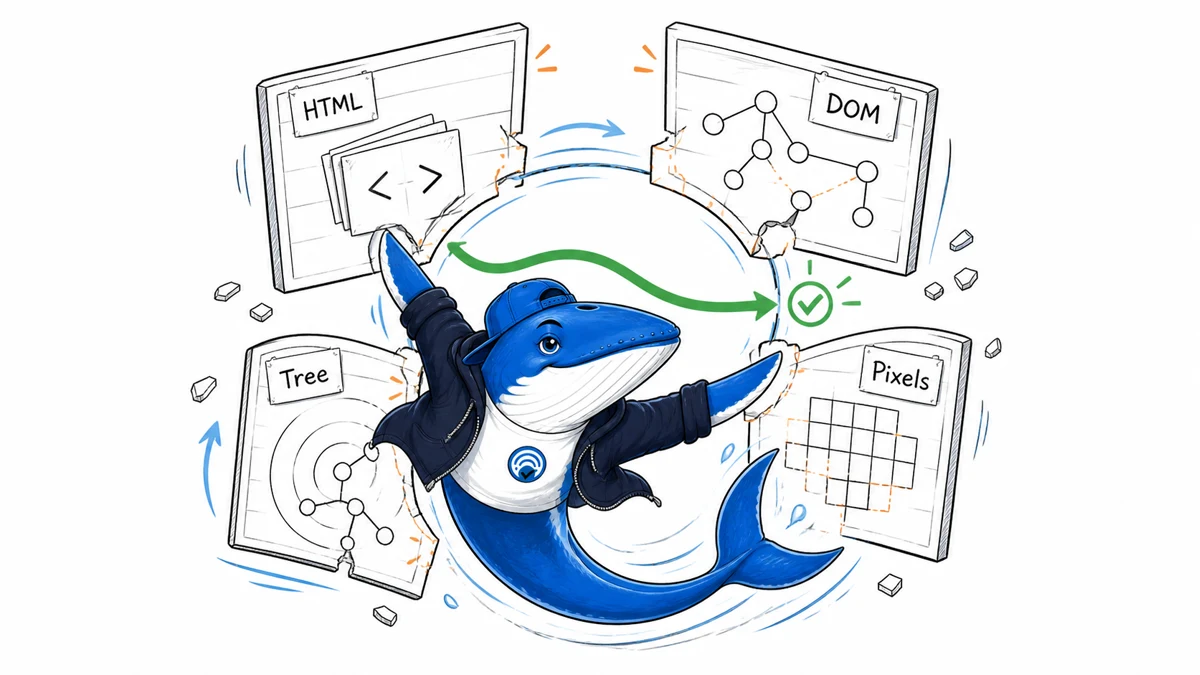
Direct finding: no single page representation preserved every answer in our ten-task fixture. Raw HTML contained 6 of 10 exact answers. The rendered DOM, accessibility tree, and screenshot each contained 7 of 10, but not the same seven.
That difference matters when a browser agent fails. A screenshot can show canvas values and computed layout that a tree omits. An accessibility tree can expose a control’s exact name and runtime state without asking a model to infer them from pixels. Source or DOM markup can retain hidden content that neither a user nor an accessibility reader can currently reach.
What we tested
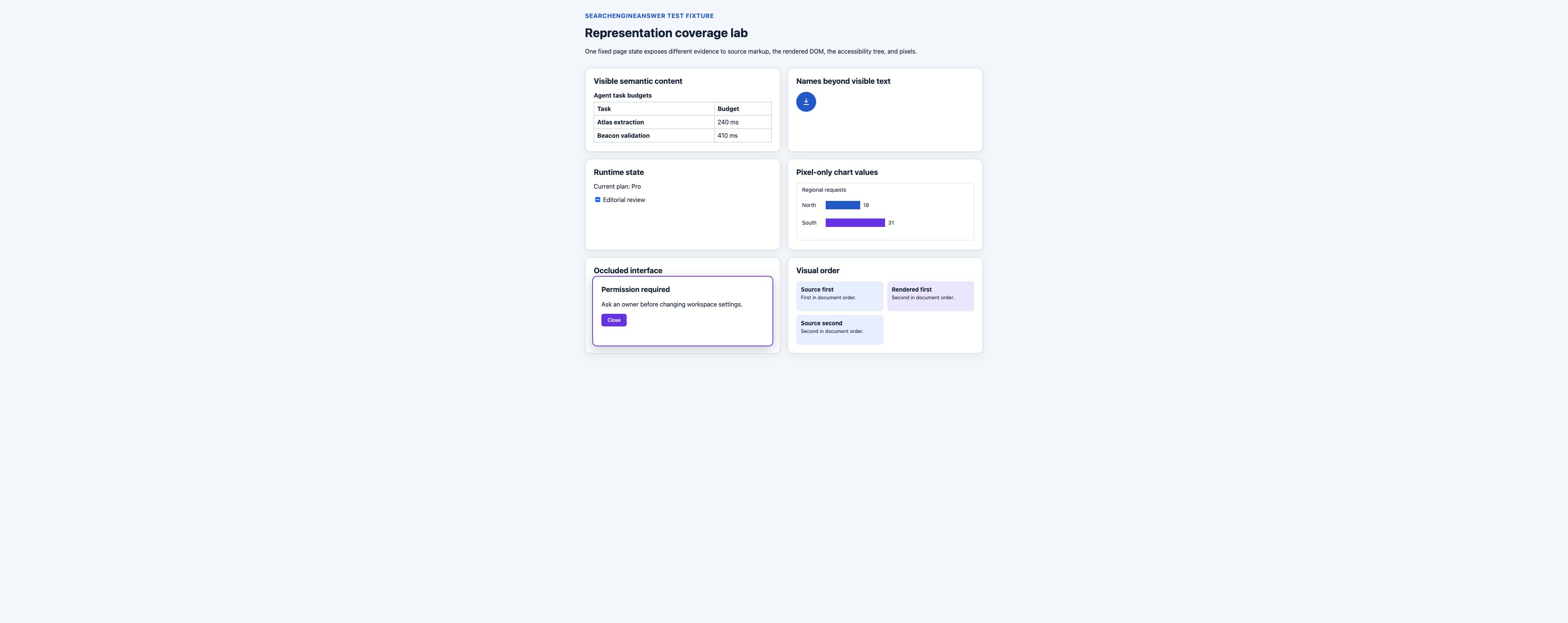
On August 31, 2026, I built one permissioned local page with six deliberately different interface conditions: a semantic table, an icon-only button, visually hidden text, JavaScript-updated text and control state, a canvas chart, hidden markup, an open dialog, and a CSS-positioned card layout.
After a fresh load in Chromium, I captured four artifacts from the same page state:
- Raw HTML: the document response only, without executing or inlining the linked JavaScript and CSS.
- Rendered DOM: the live document serialization after the external JavaScript ran. Computed layout, canvas pixels, and JavaScript properties that do not reflect to attributes remain outside it.
- Accessibility tree: the browser-exposed roles, names, states, and hierarchy after the page settled.
- Screenshot: the rendered pixels at a fixed 1280×720 CSS viewport.
The ten questions and answer keys were tied to those conditions. A representation received a 1 only when the exact answer was directly present in its artifact. Guessing from a download icon, a class name, document order, or a generic chart label did not count.
| Representation | What the capture included | What it intentionally excluded |
|---|---|---|
| Raw HTML | Document-response elements, text, and attributes | Executed state, linked resource effects, pixels |
| Rendered DOM | Live elements, text, and serialized attributes | Computed layout, canvas pixels, non-reflected IDL state |
| Accessibility tree | Exposed roles, names, states, values, and hierarchy | Hidden subtrees and most visual-only relationships |
| Screenshot | Visible text, layout, control rendering, and canvas pixels | Hidden semantics, exact accessible names, hidden markup |
The same 7-of-10 total hid different misses
The rendered DOM, accessibility tree, and screenshot each preserved seven answers. That superficial tie disappears when the individual tasks are compared.
| Representation | Answers present | Coverage | Important miss |
|---|---|---|---|
| Raw HTML | 6 of 10 | 60% | Runtime plan, canvas values, runtime checkbox state, visual placement |
| Rendered DOM | 7 of 10 | 70% | Canvas values, non-reflected checkbox state, visual placement |
| Accessibility tree | 7 of 10 | 70% | Canvas values, hidden control, visual placement |
| Screenshot | 7 of 10 | 70% | Exact icon name, visually hidden support code, hidden control |
These percentages describe this fixture, not browser agents in general. With only ten deliberately varied tasks, one task changes a score by ten percentage points. The useful result is the mismatch pattern: equal totals did not make the artifacts interchangeable.
Pixels preserved the canvas and computed layout
The fixture drew two regional request values into a canvas with JavaScript. The canvas had the accessible name “Regional request chart,” but its North value of 18 and South value of 31 were not present in the document HTML, the rendered DOM serialization, or the captured accessibility tree. Only the screenshot contained the answer to “Which region has 31 requests?”
The screenshot was also the only artifact that directly showed which card occupied the top of the right-hand column. The DOM and accessibility artifacts retained document order. They did not encode the final two-dimensional placement created by the linked stylesheet.
This is the boundary described in Anthropic’s current browser-use documentation: use element references when the accessibility tree is usable, then fall back to coordinates for canvas-rendered or otherwise visually described content. The documentation also recommends screenshots when visual layout, images, or rendering state matter. That is a product contract, not proof of accuracy on our fixture, but the boundary matches the two pixel-only cases we observed.
The accessibility tree added names and runtime state
The icon-only export button contained no visible words. Its aria-label gave the accessibility tree the exact name “Export audit results.” A screenshot showed a downward-arrow icon, but our decision rule rejected a guess about what that icon meant.
The strongest tree-only difference was a checkbox whose JavaScript indeterminate property was set after load. That property did not serialize into the raw HTML or rendered DOM. The browser exposed the control as checked=mixed, and the screenshot showed its dash-shaped mixed state.
This behavior has a standards basis. The W3C’s current HTML Accessibility API Mappings draft defines how user agents expose HTML roles, names, states, properties, and events to accessibility APIs. It also warns that HTML features and accessibility APIs do not have a one-to-one relationship. The tree is a browser-produced semantic view, not a shorter copy of the DOM.
HTML retained evidence that users could not reach
One fixture subtree contained a “Delete workspace” button with the HTML hidden attribute. Both HTML artifacts retained the text. The accessibility tree excluded the subtree, and the screenshot did not render it.
That does not make HTML the better action surface. It makes source and DOM captures useful debugging artifacts. Hidden markup can explain why a selector, parser, or prompt saw a phrase that was unavailable in the active interface. It can also be misleading or hostile input when an agent treats every source string as an instruction.
Anthropic’s browser security guidance recommends constructing page reads from rendered accessibility or visible content rather than raw DOM source so hidden text does not reach the model by default. Preserve raw or rendered markup when the diagnostic question requires it; do not assume hidden content represents an available control.
A practical capture sequence for browser-agent failures
The fixture supports a layered debugging sequence rather than one preferred representation.
- Freeze the page state. Record URL, viewport, browser version, locale, authentication state, cookies or clean profile, initial focus, and the action immediately before failure.
- Capture structure and state first. Save the accessibility tree or equivalent page-aware read. It usually gives controls stable roles and names without requiring visual inference.
- Add a screenshot for visual evidence. Capture pixels when layout, canvas, charts, occlusion, drag targets, rendering state, or coordinate selection can affect the task.
- Retain raw and rendered markup for diagnosis. Compare the document response with the live DOM when JavaScript, hidden content, stale selectors, hydration, or attribute reflection may explain the difference.
- Log the action result separately. A usable representation does not prove the model chose the right element, the executor dispatched the action correctly, or the page reached the intended state.
Cloudflare’s current Browser Rendering API reference reflects the same need for multiple evidence products: its snapshot response can include HTML content, Markdown, an accessibility tree, and a screenshot. Cloudflare’s July 7, 2026 changelog introduced the standalone accessibility-tree endpoint. Endpoint availability does not establish that one format is always faster, cheaper, or more accurate.
The small-experiment method provides an observation-card structure for freezing conditions, while the tool evaluation guide explains why one aggregate score should not hide representation-specific tradeoffs.
Inspect the task-level data and fixtures
Download the ten-row representation coverage CSV. Each row includes the question, answer key, four binary coverage decisions, and an adjudication note. The unit is one fixed task, not a model response.
The fixture and capture bundle contains the HTML, CSS, JavaScript, method note, raw document response, rendered DOM capture, accessibility tree, screenshot, result CSV, and summary. No credentials, account data, third-party page content, or production logs are included.
To reproduce the audit, serve the fixture locally, use a fresh Chromium page at 1280×720 CSS pixels, wait for the linked script to complete, then recapture all four artifacts before adjudicating. If a browser or accessibility implementation changes, treat that as a new run rather than overwriting the old result.
What this audit does not establish
- No AI model was scored. Evidence present in an artifact can still be ignored or misread.
- The ten tasks were constructed to expose representation boundaries, not sampled from production traffic.
- The captures came from one settled Chromium page state on one local machine. They do not measure differences among browser engines, operating systems, accessibility back ends, viewport sizes, or later browser releases.
- The audit does not compare token use, latency, cost, action success, recovery behavior, or safety.
- It does not test accessibility conformance or claim that an agent’s tree read is equivalent to a person’s assistive-technology experience.
- It does not rank Cloudflare Browser Run, Anthropic browser use, or any other product.
A later model benchmark would need frozen prompts, model and tool versions, repeated runs, task-order randomization, action logs, latency and usage records, a stopping rule, and blinded adjudication. Those results should be published as a separate study.
The representation is part of the evidence contract
A browser agent does not receive “the page” in the abstract. It receives a representation with specific omissions. In this fixture, pixels were necessary for canvas values and computed layout; the accessibility tree exposed an exact control name and non-serialized mixed state; HTML retained hidden content that the active interface excluded.
Start with the structured, exposed page state when an agent needs to understand and act. Add pixels when visual state matters. Keep raw and rendered markup for the diagnostic cases they can actually answer. The failure report should name which artifact supported each conclusion instead of treating all four as interchangeable views.
Preservation test
The best representation depends on the question the agent must answer
A screenshot preserves appearance but can hide relationships. Raw HTML preserves markup but includes irrelevant implementation detail. An accessibility tree can expose roles and names while omitting visual evidence.
- Use a screenshot for visual state and layout claims.
- Use HTML or DOM for attributes, links and source order.
- Use the accessibility tree for roles, accessible names and operable structure.
My takeaway: In the ten fixed tasks, no representation was universally best. I would choose the smallest representation that preserves the evidence required by the task.
Keep learning
Continue this topic
Next in this topic
Page Weight vs Extractable Text: Results From a 25-Site Audit
Earlier in this topic
Google ranking volatility: diagnose a traffic drop with evidence
Research
Ask a question or join the discussion