
← Tool directory
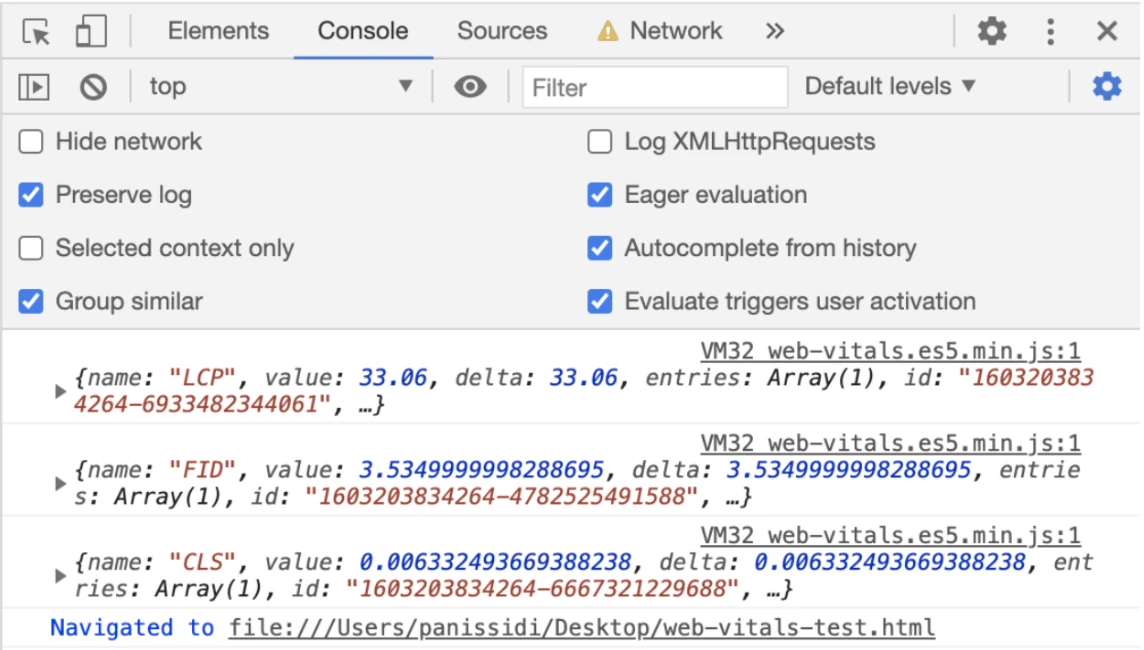
Sample console output from Google Codelabs ↗
TOOL PROFILE
web-vitals
Collect Largest Contentful Paint, Interaction to Next Paint, and Cumulative Layout Shift from real page visits.
Open source
Community support
1 upvoteSign in to upvote
Upvotes come from SearchEngineAnswer members. GitHub stars and reader reviews are counted separately.
Claim this tool if you maintain it.
- Best for
- Performance
- Setup required
- Use a JavaScript build that can import the package. Production reporting needs a destination for the measurements.
- Costs to check
- The library is open source. Production data collection can incur analytics and storage costs.
- License in catalog
- Apache-2.0
Project screenshot
GitHub repository
- GitHub stars
- 8,674
- Forks
- 539
- Last push
- 2026-11-09
- Primary language
- JavaScript
GitHub snapshot from . Stars count GitHub bookmarks. Reader ratings appear separately below.
How to install web-vitals
-
Install web-vitals in the project that builds the browser bundle.
npm install web-vitals - Import onCLS, onINP, and onLCP in a browser entry point and attach a reporting callback to each metric you want to collect.
First tutorial for web-vitals
- Open a staging page with the callbacks writing to the console.
- Interact with the page and inspect the named measurements that your browser supports.
- Introduce a layout shift in a local test fixture, then compare the CLS result under the same conditions.
Where web-vitals fits
Use it when you need performance measurements from visits to your own page templates.
- When to choose another tool
- Use a controlled Lighthouse run to reproduce a single change during development.
- First evaluation
- Instrument one staging template and compare the callback values with and without a deliberate layout shift.
- How to interpret the result
- Record browser support and the test conditions. One session shows how the instrumentation behaves and cannot establish a production percentile.
Reviews and discussion
Reader reviews
Be the first to share your experience with this tool.
Discussion
Ask a question or share a setup tip.
Flag an outdated detail
Include the field that needs updating and a source link. Copy your draft, then use the corrections policy to contact the editorial team.
Write a review or join the discussion