

ReplayWeb.page
Replay a saved site capture before a migration and inspect what the archive actually preserved.
Community support
Upvotes come from SearchEngineAnswer members. GitHub stars and reader reviews are counted separately.
Claim this tool if you maintain it.
- Best for
- Crawling
- Setup required
- Open a WACZ file in the browser viewer or install the desktop release for your operating system.
- Costs to check
- AGPL-3.0 viewer. Capture, storage and hosting costs depend on the workflow that produces and distributes the archive.
- License in catalog
- AGPL-3.0
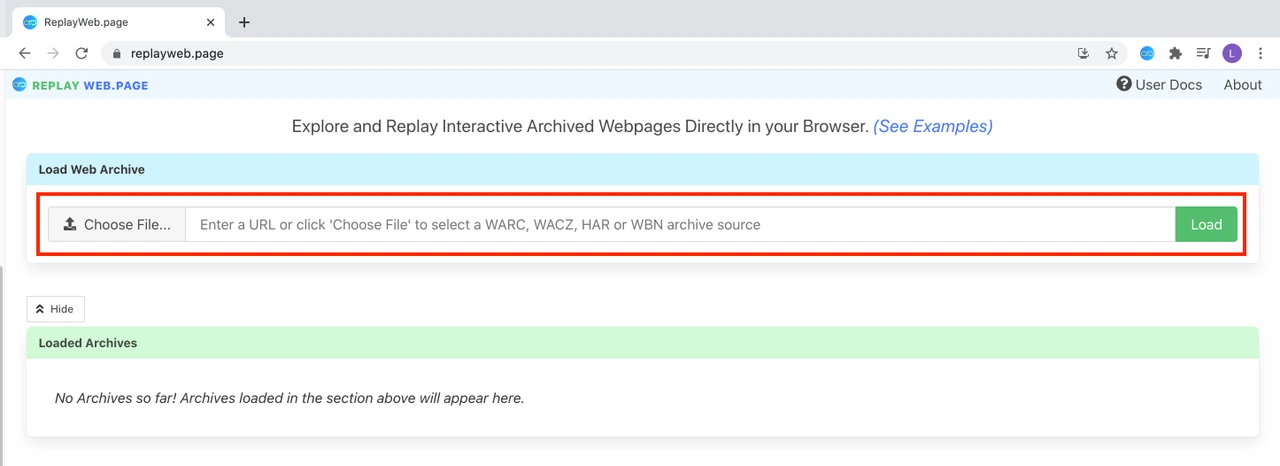
Project screenshot
GitHub repository
- GitHub stars
- 1,018
- Forks
- 96
- Last push
- 2026-11-19
- Primary language
- TypeScript
GitHub snapshot from . Stars count GitHub bookmarks. Reader ratings appear separately below.
How to install ReplayWeb.page
- For the desktop route, download and install the project release that matches your operating system. The browser viewer at replayweb.page is also available.
- Place a WACZ archive you are allowed to inspect in a local folder. Use Choose File and Load to open it in the viewer.
First tutorial for ReplayWeb.page
- Load a pre-migration archive with two known captured pages and note the date of the capture.
- Open the landing page from the page list. Check its heading and hero image, then follow the archived link to the second page.
- Record the source and destination URLs and whether the replay has both pages. Save missing captures as evidence gaps to review against the live site.
Documentation reviewed on November 20, 2026. The tutorial is a proposed check with illustrative files and URLs.
Where ReplayWeb.page fits
Use ReplayWeb.page to review a Browsertrix archive when a single screenshot cannot show navigation and other captured resources.
- When to choose another tool
- Use a fresh browser audit for current redirects, live response headers or search eligibility after a migration.
- First evaluation
- Choose an archived landing page with a known hero image and a link to a second captured page. Record what works in replay.
- How to interpret the result
- A dead link in replay can mean that its destination was missing from the capture. Compare the archive timestamp and URLs before treating it as a live regression.
Reviews and discussion
Reader reviews
Be the first to share your experience with this tool.
Discussion
Ask a question or share a setup tip.
Flag an outdated detail
Include the field that needs updating and a source link. Copy your draft, then use the corrections policy to contact the editorial team.
Write a review or join the discussion