

Pagefind
Build an internal search index from generated HTML for a static publication.
Community support
Upvotes come from SearchEngineAnswer members. GitHub stars and reader reviews are counted separately.
Claim this tool if you maintain it.
- Best for
- Publishing
- Setup required
- Use Node.js and npm, and build your static site to an output folder such as public.
- Costs to check
- The software is open source. The generated index files are served with the site.
- License in catalog
- MIT
Project screenshot
GitHub repository
- GitHub stars
- 5,557
- Forks
- 219
- Last push
- 2026-11-11
- Primary language
- Rust
GitHub snapshot from . Stars count GitHub bookmarks. Reader ratings appear separately below.
How to install Pagefind
-
Install Node.js and npm, then build the site into your static output directory.
npx pagefind --site "public" - Run Pagefind with npx and the output path. Confirm that the generated pagefind directory appears inside the output.
First tutorial for Pagefind
- Build two articles with distinct phrases and run the indexer on the output directory.
- Add the search interface using the Pagefind quick start and serve the generated site locally.
- Search for one distinctive phrase and open the result. Change the phrase, rebuild both the site and index, and check the result again.
Where Pagefind fits
Use Pagefind when readers need to search a static article archive by words found in the published text.
- When to choose another tool
- Use a search service with a runtime index when content needs to appear in search without a site rebuild.
- First evaluation
- Build a fixture containing two articles with distinct terms, then generate the index and search for one of those terms.
- How to interpret the result
- Check the result title and URL, and rebuild the index after editing the matching article to confirm the old term disappears.
Practical workflow
Index the article body
Place data-pagefind-body on the article content you want searchable. Mark repeated interface content with data-pagefind-ignore where needed. Rebuild the site before running Pagefind so the index reflects the exact HTML you plan to deploy.
Verify search before publishing
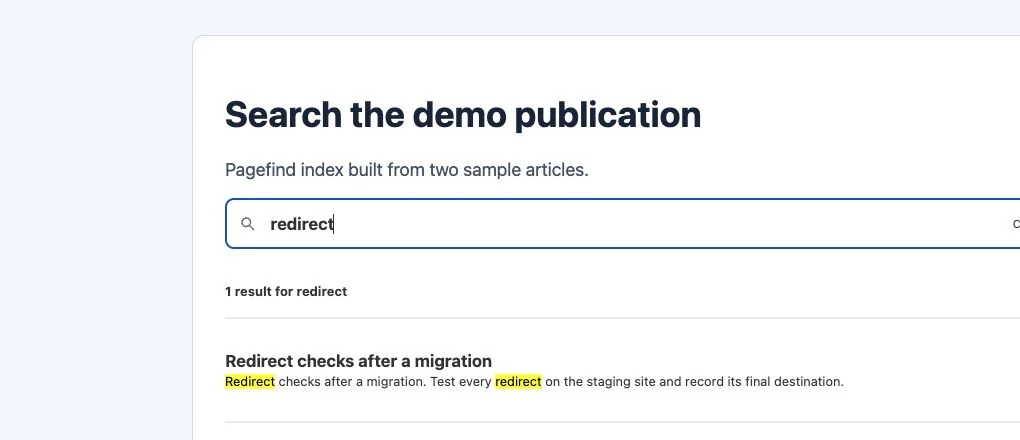
Build two sample articles with distinct phrases. Index the output folder and use the search interface to find one phrase. Open the result and confirm that the destination and title match. In the local example, searching for “redirect” returned the sample article about migration redirects.
Ship the index with the same release
Deploy the generated pagefind directory alongside the matching HTML. Rebuild and deploy both after an article changes or moves. If the interface loads but returns no results, check that the index files are reachable and that the source pages contain indexable content. Pagefind controls search within your site.
Reviews and discussion
Reader reviews
Be the first to share your experience with this tool.
Discussion
Ask a question or share a setup tip.
Flag an outdated detail
Include the field that needs updating and a source link. Copy your draft, then use the corrections policy to contact the editorial team.
Write a review or join the discussion