

Pa11y
Run automated accessibility checks on rendered pages before publishing.
Community support
Upvotes come from SearchEngineAnswer members. GitHub stars and reader reviews are counted separately.
Claim this tool if you maintain it.
- Best for
- Site audits
- Setup required
- Use a supported Node.js release, npm, and the browser installed by Puppeteer. The tutorial uses the axe runner.
- Costs to check
- The software runs locally and requires no paid account for this workflow.
- License in catalog
- LGPL-3.0-only
Project screenshot
GitHub repository
- GitHub stars
- 4,599
- Forks
- 314
- Last push
- 2026-11-09
- Primary language
- JavaScript
GitHub snapshot from . Stars count GitHub bookmarks. Reader ratings appear separately below.
How to install Pa11y
-
Create a Node.js project and install Pa11y as a development dependency.
npm install --save-dev pa11y - Run npx pa11y --version. If your package manager skipped the browser download, follow Pa11y’s browser setup instructions.
First tutorial for Pa11y
-
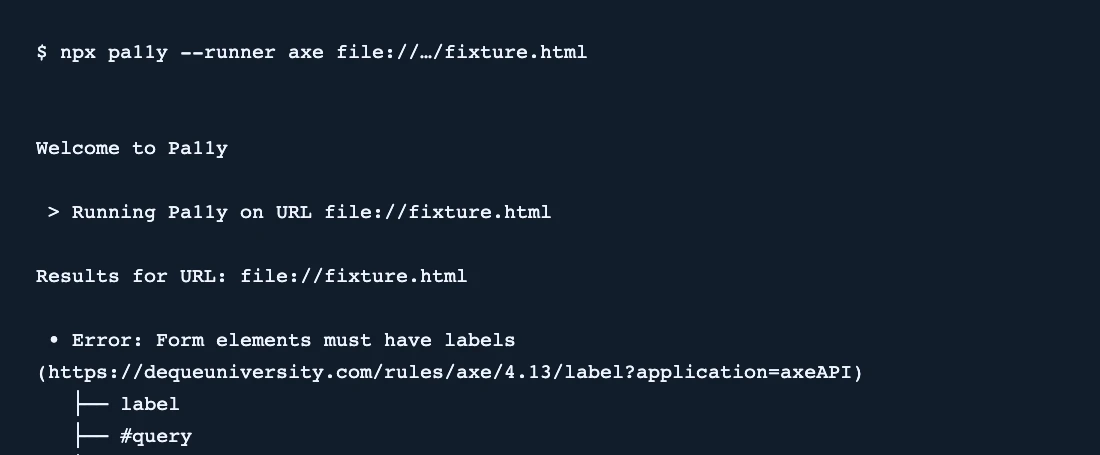
Save a local HTML page with a search field that has id query and no accessible label.
npx pa11y --runner axe file:///absolute/path/to/fixture.html - Run the example with the absolute file URL for your fixture. Confirm that the axe report identifies the unlabeled field.
- Add a visible label with for="query", rerun the check, and verify that the label error disappears. Use the keyboard to confirm that the form still works.
SearchEngineAnswer reproduced the missing-label report and cleared it after adding a visible label. The test used the axe runner with local Chrome.
Where Pa11y fits
Use Pa11y to catch issues such as unlabeled search fields in an article or landing-page template.
- When to choose another tool
- Use keyboard and assistive technology testing to review interaction issues that automated rules cannot detect.
- First evaluation
- Add an unlabeled search field to a local fixture. Run the axe check and confirm that the report identifies the field.
- How to interpret the result
- Add a visible label and repeat the same check. A clear run means that the selected rules found no issues in that fixture.
Reviews and discussion
Reader reviews
Be the first to share your experience with this tool.
Discussion
Ask a question or share a setup tip.
Flag an outdated detail
Include the field that needs updating and a source link. Copy your draft, then use the corrections policy to contact the editorial team.
Write a review or join the discussion