

hyperfine
Benchmark local crawl-processing and preflight commands across repeated runs.
Community support
Upvotes come from SearchEngineAnswer members. GitHub stars and reader reviews are counted separately.
Claim this tool if you maintain it.
- Best for
- Performance
- Setup required
- Use a shell, hyperfine, and the commands you want to measure. The example uses ripgrep and a local dist directory.
- Costs to check
- The open-source tool runs locally. This workflow requires no paid service.
- License in catalog
- Apache-2.0
Project screenshot
GitHub repository
- GitHub stars
- 29,276
- Forks
- 645
- Last push
- 2026-11-01
- Primary language
- Rust
GitHub snapshot from . Stars count GitHub bookmarks. Reader ratings appear separately below.
How to install hyperfine
-
Install hyperfine with Homebrew on macOS or use the official binary for your platform.
brew install hyperfine - Run hyperfine --version. Confirm that rg -l noindex dist returns at least one match before timing it.
First tutorial for hyperfine
-
Use a sample dist directory with a page containing a noindex directive. Run the search once and confirm that it finds the expected file.
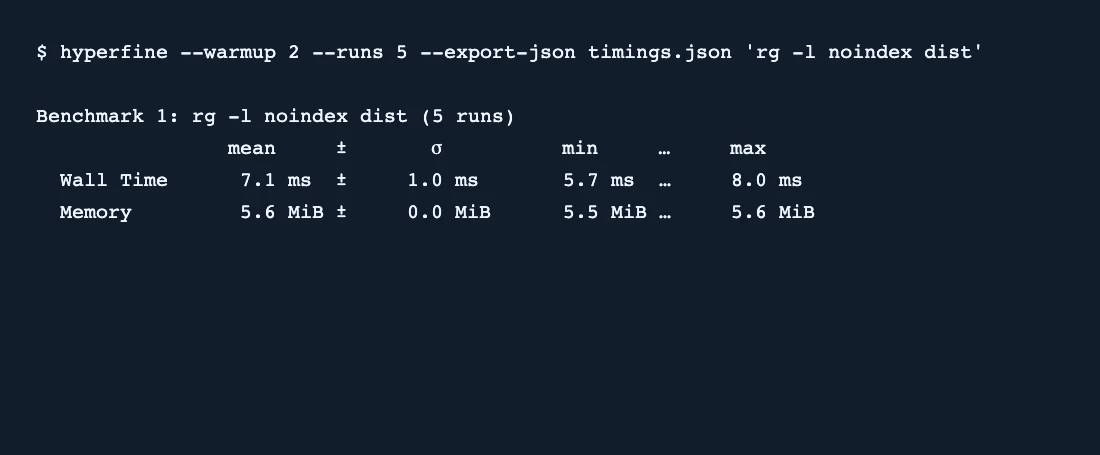
hyperfine --warmup 2 --runs 5 --export-json timings.json 'rg -l noindex dist' - Run the example from the same directory. Review the wall-clock summary and open timings.json.
- In hyperfine 2.0, check that results[0].measurements contains five entries. Keep the input and machine conditions consistent if you compare a second command.
SearchEngineAnswer confirmed five measured runs with hyperfine 2.0. The screenshot records a small local fixture and illustrates the report format.
Where hyperfine fits
Use hyperfine to compare repeatable command-line jobs on the same crawl export or generated site build.
- When to choose another tool
- Use browser timing or field data to measure page experience. This benchmark measures a command running on your machine.
- First evaluation
- Benchmark one local search with two warmups and five measured runs. Export JSON and verify that the file contains the expected command and run data.
- How to interpret the result
- Repeat the test with a representative build before making decisions about performance. Check the variation and compare equivalent outputs when testing two commands.
Reviews and discussion
Reader reviews
Be the first to share your experience with this tool.
Discussion
Ask a question or share a setup tip.
Flag an outdated detail
Include the field that needs updating and a source link. Copy your draft, then use the corrections policy to contact the editorial team.
Write a review or join the discussion