

HTML Validate
Catch duplicate IDs and other markup problems in generated templates before deployment.
Community support
Upvotes come from SearchEngineAnswer members. GitHub stars and reader reviews are counted separately.
Claim this tool if you maintain it.
- Best for
- Site audits
- Setup required
- Use a supported Node.js release and npm. The example validates a local HTML file produced by a template or static build.
- Costs to check
- The software runs locally and requires no paid account for this workflow.
- License in catalog
- MIT
Project screenshot
GitHub repository
- GitHub stars
- 19
- Forks
- 2
- Last push
- 2026-11-13
- Primary language
- TypeScript
GitHub snapshot from . Stars count GitHub bookmarks. Reader ratings appear separately below.
How to install HTML Validate
-
Install html-validate as a development dependency in your Node.js project.
npm install --save-dev html-validate - Run npx html-validate --version and locate the generated file you want to validate.
First tutorial for HTML Validate
-
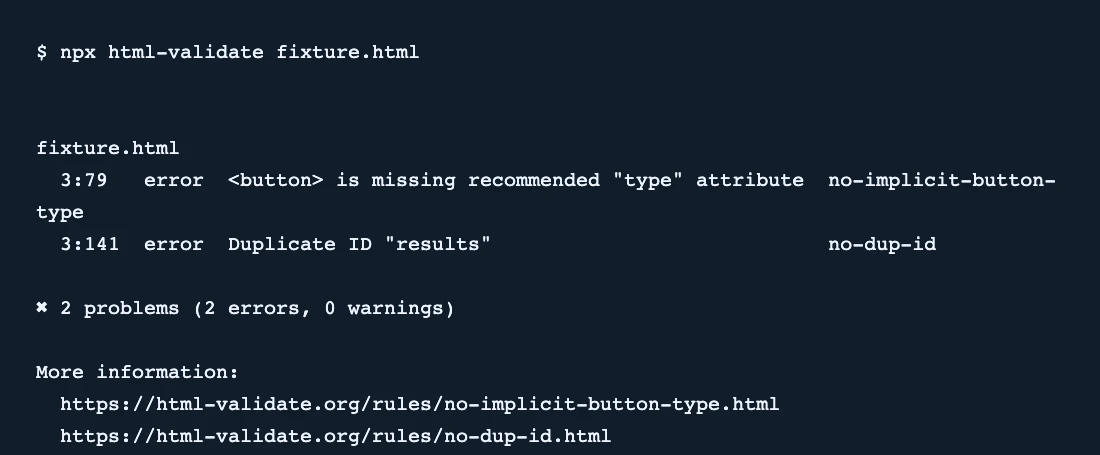
Save fixture.html with a form button and two elements that both use id="results".
npx html-validate fixture.html - Run the example and look for no-dup-id and no-implicit-button-type in the report.
- Give each element a distinct ID and set the form button type to submit if it should submit the form. Rebuild and rerun the command to confirm both errors clear.
SearchEngineAnswer verified both rule failures and a clean run after the fixes. GitHub statistics refer to the project’s mirror. The main project is hosted on GitLab.
Where HTML Validate fits
Use HTML Validate when you can check generated HTML in continuous integration before publishing it.
- When to choose another tool
- Use a browser or crawler to inspect markup added after JavaScript runs or to check production HTTP responses.
- First evaluation
- Create a page with two elements using the same results ID and a button with no explicit type. Validate the file and check the reported line and rule for each issue.
- How to interpret the result
- Give the elements unique IDs and set the intended button type. Rebuild the page before repeating the check so the change is verified in the actual output.
Reviews and discussion
Reader reviews
Be the first to share your experience with this tool.
Discussion
Ask a question or share a setup tip.
Flag an outdated detail
Include the field that needs updating and a source link. Copy your draft, then use the corrections policy to contact the editorial team.
Write a review or join the discussion