

Datasette
Turn a crawl export into a searchable SQLite report with SQL queries and shareable views.
Community support
Upvotes come from SearchEngineAnswer members. GitHub stars and reader reviews are counted separately.
Claim this tool if you maintain it.
- Best for
- Reporting
- Setup required
- Use Python, a virtual environment, and the SQLite command-line tool for the CSV import in this tutorial.
- Costs to check
- The software is open source. Local use has no hosting cost. Sharing a live instance requires hosting and access controls.
- License in catalog
- Apache-2.0
Project screenshot
GitHub repository
- GitHub stars
- 11,586
- Forks
- 962
- Last push
- 2026-11-12
- Primary language
- Python
GitHub snapshot from . Stars count GitHub bookmarks. Reader ratings appear separately below.
How to install Datasette
-
Create and activate a Python virtual environment. Install Datasette with pip.
datasette serve seo-audit.db -h 127.0.0.1 -p 8971 - Run datasette --version and confirm that sqlite3 is available for importing the sample CSV.
First tutorial for Datasette
-
Save a sample crawl.csv with url, status, and canonical columns. Include four distinct URLs with status values 200, 301, 404, and 301.
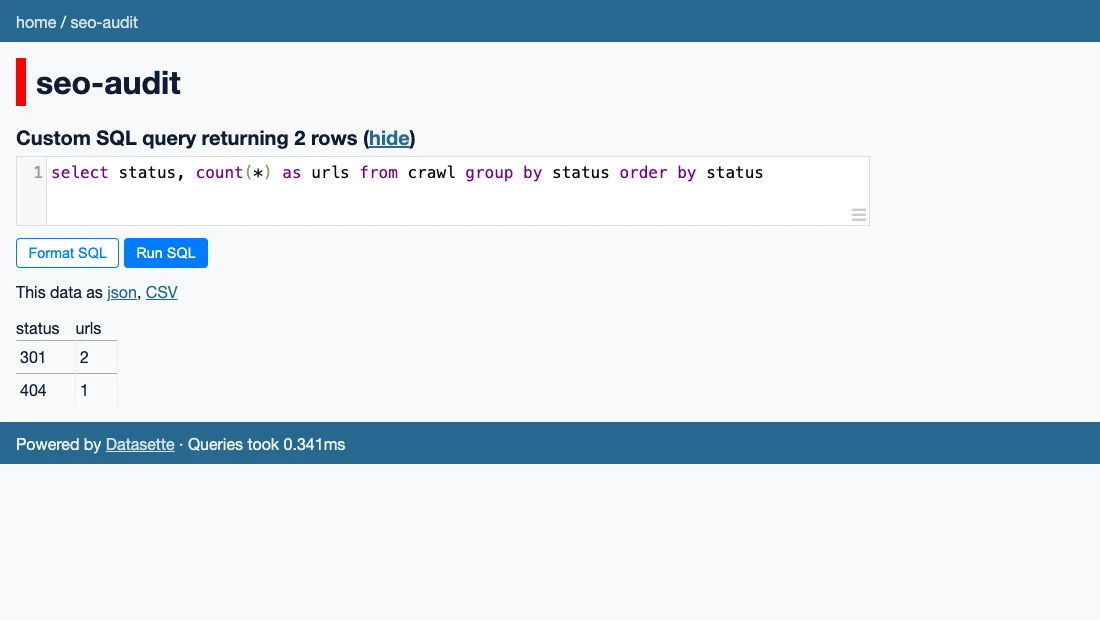
SELECT status, COUNT(*) AS urls FROM crawl GROUP BY status ORDER BY status; - Open seo-audit.db with sqlite3, run .mode csv, then run .import --skip 1 crawl.csv crawl. Exit SQLite and start Datasette with the command below.
- Open http://127.0.0.1:8971, select seo-audit, and run the SQL example. Confirm that 301 appears twice. Inspect the underlying URL rows before deciding which redirects to investigate.
SearchEngineAnswer ran the query on a local four-row fixture. Keep production exports private until access controls are configured. The tool queries recorded statuses and does not follow redirects.
Where Datasette fits
Use Datasette when a team needs to inspect the same crawl export and drill from status totals into the individual URLs.
- When to choose another tool
- Use a crawler to collect fresh responses. Datasette serves a saved snapshot and depends on the accuracy of the imported data.
- First evaluation
- Import four sample URLs with statuses 200, 301, 404, and 301. Group the crawl table by status and open the rows behind the two redirects.
- How to interpret the result
- Two rows with status 301 confirm the fixture query. Before drawing conclusions about a migration, check the export date and validate the actual redirect destinations.
Reviews and discussion
Reader reviews
Be the first to share your experience with this tool.
Discussion
Ask a question or share a setup tip.
Flag an outdated detail
Include the field that needs updating and a source link. Copy your draft, then use the corrections policy to contact the editorial team.
Write a review or join the discussion