

csvkit
Filter crawl exports into focused CSV reports for redirects, errors, and other technical SEO checks.
Community support
Upvotes come from SearchEngineAnswer members. GitHub stars and reader reviews are counted separately.
Claim this tool if you maintain it.
- Best for
- Reporting
- Setup required
- Use Python, pip, and a shell. Export a CSV with a header row and consistent field separators.
- Costs to check
- The software is open source. This workflow processes files locally and requires no account or hosted service.
- License in catalog
- MIT
Project screenshot
GitHub repository
- GitHub stars
- 6,420
- Forks
- 710
- Last push
- 2026-11-09
- Primary language
- Python
GitHub snapshot from . Stars count GitHub bookmarks. Reader ratings appear separately below.
How to install csvkit
-
Create and activate a Python virtual environment, then run python -m pip install csvkit.
python -m pip install csvkit - Run csvgrep --help and csvcut --help to confirm that both commands are available in the active shell.
First tutorial for csvkit
-
Save crawl.csv with url and status columns and four sample rows with status values 200, 301, 404, and 301.
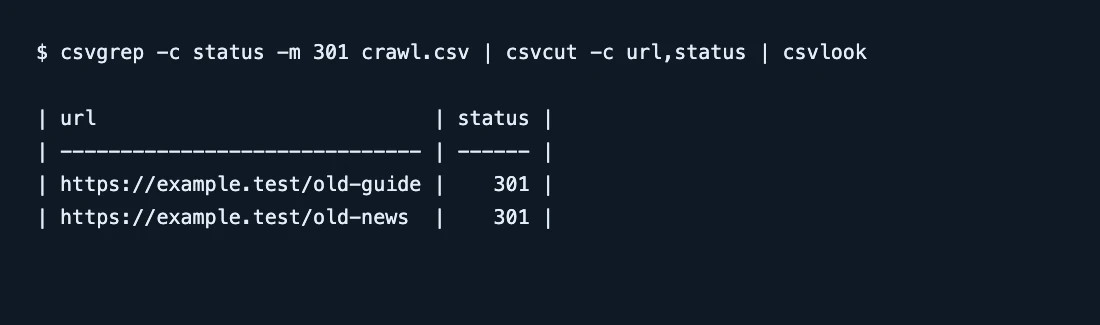
csvgrep -c status -m 301 crawl.csv | csvcut -c url,status - Run the pipeline below. Confirm that its output contains a header and only the two URLs with status 301.
- Add a 302 row and run the pipeline again. The two original matches should remain. Change the filter value to 302 when you want a separate temporary-redirect report.
SearchEngineAnswer ran this filter on a synthetic crawl export. Pipe the result to csvlook for a terminal preview or redirect the raw CSV into a file for handoff.
Where csvkit fits
Use csvkit when you need to repeat the same filter on each crawl export and hand the resulting URL list to a developer.
- When to choose another tool
- Use a crawler to verify current responses or a database if you need to join many historical exports.
- First evaluation
- Filter a four-row export for status 301, retain only the URL and status columns, and confirm that exactly two data rows remain.
- How to interpret the result
- The filter checks the exported status field. Verify destination URLs and redirect chains separately before you approve a migration.
Reviews and discussion
Reader reviews
Be the first to share your experience with this tool.
Discussion
Ask a question or share a setup tip.
Flag an outdated detail
Include the field that needs updating and a source link. Copy your draft, then use the corrections policy to contact the editorial team.
Write a review or join the discussion