

Ajv CLI
Catch malformed JSON crawl records before they enter an SEO report or automation.
Community support
Upvotes come from SearchEngineAnswer members. GitHub stars and reader reviews are counted separately.
Claim this tool if you maintain it.
- Best for
- Reporting
- Setup required
- Use Node.js, npm, a JSON Schema file, and saved JSON records. The tutorial uses the default JSON Schema draft supported by Ajv CLI.
- Costs to check
- The open-source tool runs locally. The tutorial requires no account or paid service.
- License in catalog
- MIT
Project screenshot
GitHub repository
- GitHub stars
- 319
- Forks
- 77
- Last push
- 2024-07-30
- Primary language
- TypeScript
GitHub snapshot from . Stars count GitHub bookmarks. Reader ratings appear separately below.
How to install Ajv CLI
-
Create a Node.js project and run npm install --save-dev ajv-cli.
npm install --save-dev ajv-cli - Save the example schema as schema.json and create the two JSON records in the same folder.
First tutorial for Ajv CLI
-
Create crawl-invalid.json with url set to https://example.test/audit/ and status set to the string 200. Create crawl-valid.json with the same values and status as an integer.
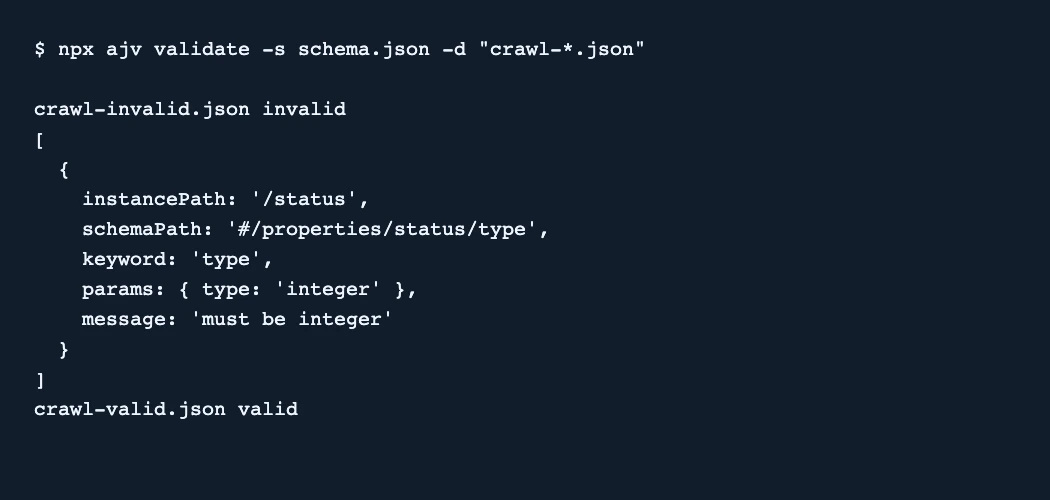
{"type":"object","required":["url","status"],"properties":{"url":{"type":"string"},"status":{"type":"integer","minimum":100,"maximum":599}}} - Run npx ajv validate -s schema.json -d "crawl-*.json". The report should identify /status in the invalid file and mark the second file valid.
- Fix the type at the point where the export is produced. Rerun validation and check that both files pass before importing them.
The local test rejected a string status and accepted an integer. The schema checks that url is a string and that status is an integer between 100 and 599.
Where Ajv CLI fits
Use Ajv CLI to check the shape and types of crawl records consistently before importing them.
- When to choose another tool
- Use a live crawl or an HTTP client to verify actual server responses. A valid record can still report stale or inaccurate data.
- First evaluation
- Prepare two records with the same URL. Store the status as the string 200 in one and the integer 200 in the other.
- How to interpret the result
- The string should fail and the integer should pass. Check the reported data path to find the field to fix in the export pipeline.
Reviews and discussion
Reader reviews
Be the first to share your experience with this tool.
Discussion
Ask a question or share a setup tip.
Flag an outdated detail
Include the field that needs updating and a source link. Copy your draft, then use the corrections policy to contact the editorial team.
Write a review or join the discussion