SEO Client Reporting: A One-Page Report Template
Use a downloadable one-page SEO client report template to connect Search Console observations, business outcomes, release notes, limitations, and the next action.
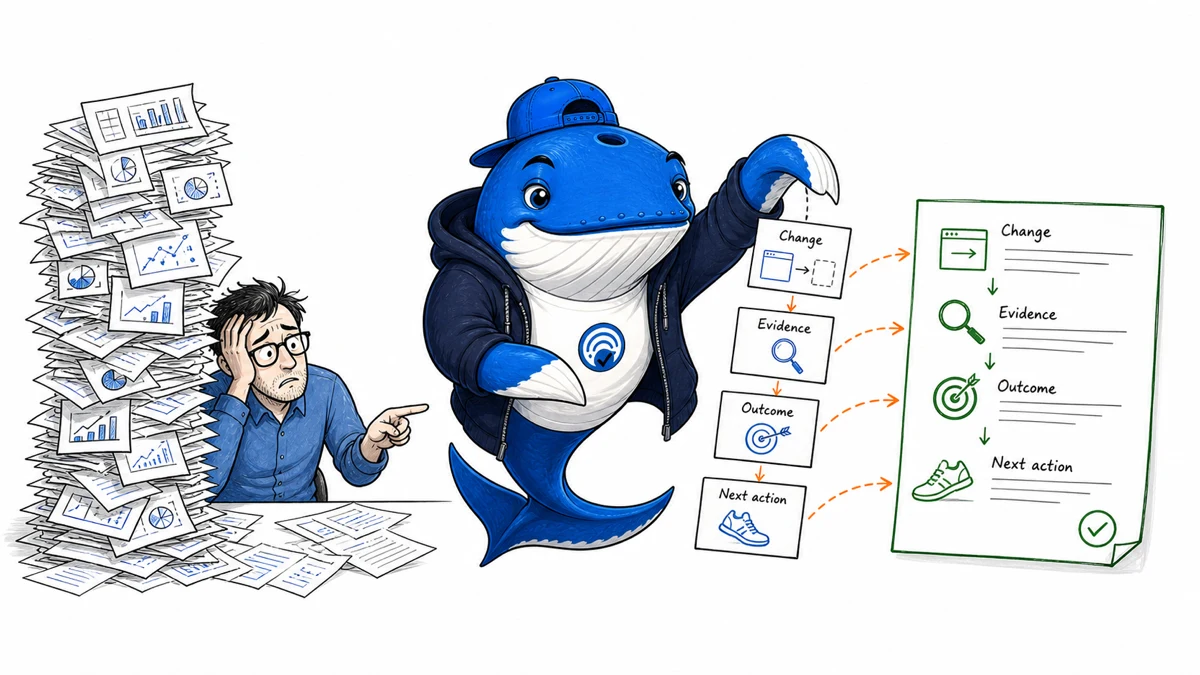
A useful SEO client report is a decision record, not a gallery of charts. It should show the business goal, material changes, the search observation, the on-site outcome, important limits, and one owned next action. Detailed exports can sit behind that first page.
Download the one-page report CSV template
The one-page SEO report template
| Section | What to show | Decision it supports |
|---|---|---|
| Goal | One business outcome and its measurement boundary | What success means |
| Material changes | Released pages, migrations, fixes, promotions, outages | What may explain movement |
| Search observation | Clicks, impressions, query mix, landing pages, device, and country | Where visibility changed |
| On-site outcome | Qualified sessions, key events, leads, or revenue where reliable | Whether visits completed the intended job |
| Limits | Consent gaps, attribution model, seasonality, campaigns, and tracking changes | How confident to be |
| Next action | Owner, action, expected mechanism, check date, and stop rule | What happens now |
The downloadable CSV has one row for each section plus columns for scope, comparison period, observation, interpretation, confidence, owner, check date, stop rule, and source export. It is intentionally plain so it can be opened in Excel, Google Sheets, LibreOffice, or a text editor without depending on a reporting platform.
A worked example from SearchEngineAnswer
This example uses the Google Search Console Web performance report for https://searchengineanswer.com/ from August 8 through August 26, 2026. It is a small, new property, so the purpose is to demonstrate the reasoning;not to establish a benchmark for other websites.
| Scope | Clicks | Impressions | CTR | Average position |
|---|---|---|---|---|
| Whole property | 46 | 2,554 | 1.8% | 65.4 |
| Homepage | 43 | 311 | 13.8% | Not used for this decision |
| Query: “search engine answer” | 25 | 49 | 51.0% | 5.3 |
| SERP snippet preview tool | 0 | 665 | 0% | 83.7 |
| This client-report page | 0 | 256 | 0% | 90.7 |
Observation: 43 of the property’s 46 clicks went to the homepage, while branded demand produced 25 clicks at an average position of 5.3. Two useful non-homepage pages accumulated hundreds of impressions but sat near positions 84 and 91.
Interpretation: the site has early branded recognition, but non-branded page visibility is shallow. “Improve CTR” would be the wrong first recommendation for a page whose average position is around 90. The title may still need to be clear, but the larger constraint is that few searchers reach that result. The next work should strengthen the page’s reader outcome, internal links, and relevance, then observe whether ranking depth changes.
Decision: preserve the two URLs because they have demonstrated impressions and distinct reader jobs. Rebuild the SERP preview as a native, crawlable utility with primary-source guidance. Add this downloadable report template and worked example to the client-report page. Review query and page movement after the changes have had time to be crawled and indexed.
Limits: the window covers only 19 days; the property is new; Search Console tables show top rows rather than every anonymized query; average position is an aggregate, not a live rank check; and this example does not include GA4 leads or revenue. It therefore supports a content-improvement decision, not a causal claim about business outcomes.
Start with a reporting contract
Before opening a dashboard, write down the reporting period, comparison period, Search Console property, search type, country and device filters, time zone, conversion definition, branded-query rule, and intended reader. A launch month may need a pre-release baseline. An established retailer may need year-over-year context because a week-over-week chart can confuse seasonality with performance.
Keep a release log next to the report. A line that rises after a title change does not prove the title caused the movement, especially if a promotion, outage, analytics migration, stock change, or Google update occurred in the same window. The release log makes those competing explanations visible.
Use a small metric dictionary
- Impressions and clicks: Search Console observations, with the search surface and filters declared.
- CTR: clicks divided by impressions for the selected rows and filters. A low CTR at position 90 is a different problem from a low CTR at position three.
- Average position: an aggregated Search Console metric. It should not be presented as the rank every user saw.
- Landing sessions: GA4 sessions that began on the selected page group.
- Qualified visit: a business-defined behavior, such as a product view plus an engaged threshold;not a universal SEO metric.
- Key event or lead: a configured event whose collection has been tested.
- Revenue: recorded commerce value after currency, refunds, consent, payment, and attribution limitations are stated.
Google’s Search Console performance-data documentation explains aggregation, top-row, freshness, and export behavior. Its metrics guide defines impressions, clicks, CTR, and position. GA4’s acquisition-report documentation distinguishes user acquisition from session-scoped traffic acquisition. The systems answer different questions; do not force them to match by silently changing definitions.
Separate observation, interpretation, and recommendation
Observation reports what the declared dataset shows. Interpretation explains plausible mechanisms and competing explanations. Recommendation chooses an action proportional to the evidence. Keeping those sentences separate makes uncertainty visible.
For example: “Non-branded clicks to three comparison pages increased in the declared window” is an observation. “The change may reflect new rankings, demand, or eligibility” is an interpretation. “Verify query mix and conversion quality before expanding the template” is a recommendation. A confident story should not replace a missing experiment.
End with an owner and a stop rule
- Name the page group or technical issue.
- State the evidence and its boundary.
- Choose one material action.
- Assign an owner and release date.
- Define the expected mechanism and metric.
- Set a check window and stopping rule.
A stop rule might say: “If eligible non-branded impressions do not improve after the revised page has been recrawled and observed for six weeks, stop adding copy and re-evaluate intent, competition, and internal discovery.” That rule prevents an indefinite sequence of cosmetic edits.
Preserve the query exports, GA4 exploration, release notes, and screenshots as supporting evidence. Use the AI referral tracking guide when assistants are a separate acquisition question, the weighted rate calculator when combining CTR or conversion groups, and the evidence-led publishing guide when a client finding becomes a public case study.
One-page report
A client report should end with a decision, not a dashboard tour
The page earns its space when the client can see what changed, why it matters and what happens next.
- Outcome
- Revenue, leads or another agreed business result.
- Search signal
- Clicks, qualified visibility and landing-page contribution.
- Explanation
- One evidence-backed reason for the important movement.
- Next action
- Owner, due date and expected decision.
My takeaway: I remove any chart that does not change the conversation. A smaller report with a clear decision trail is more trustworthy than a larger collection of unexplained metrics.
Primary documentation
Keep learning
Continue this topic
Next in this topic
Claude Compliance API: Govern Local Session Retrieval
Earlier in this topic
You.com Web Search GET vs POST: Cacheability and Domain-Filter Semantics
Tools & Workflows
Ask a question or join the discussion