Google Site Moves: Domain-Variant Migration Matrix
Control a domain migration across www, non-www, HTTP, HTTPS and subdomains with a downloadable mapping, launch, verification and rollback matrix.
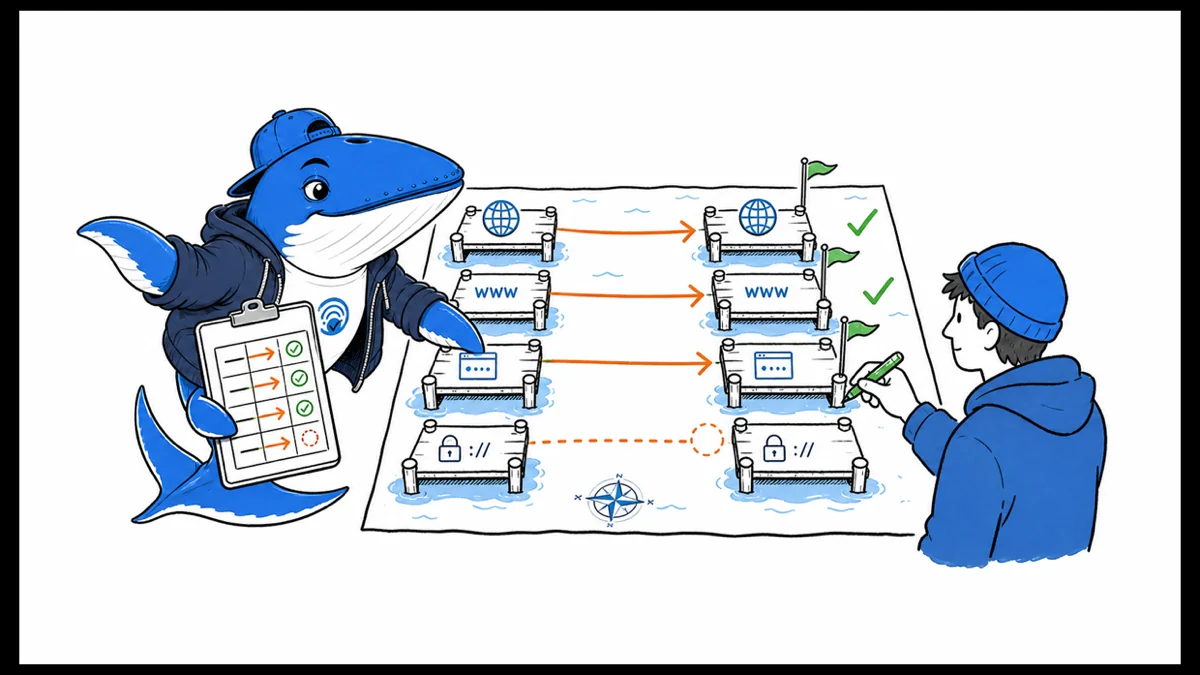
Direct answer: plan a domain move as a matrix of entry points, not one old domain and one new domain. Inventory every old and new www, non-www, HTTP, HTTPS and subdomain variant; verify the relevant Search Console properties; map URLs; test redirects and canonicals; and assign an owner and rollback trigger to every row.
Google’s current guidance distinguishes domain/subdomain moves from HTTP-to-HTTPS, same-domain www changes and path-only migrations. That distinction determines whether to use Change of Address. The downloadable matrix below makes the decision explicit before launch.
Classify the move before choosing tools
| Change | Change of Address? | Core control |
|---|---|---|
example.com → new-example.net | Yes, for verified old-domain variants | One-to-one mappings plus permanent redirects |
a.example.com → b.example.com | Yes, for the old subdomain property | Subdomain inventory and destination mapping |
| HTTP → HTTPS on the same domain | No | TLS, redirects, canonicals, internal links and sitemaps |
| www → non-www on the same domain | No | Host redirects and consistent canonical signals |
/old-path/ → /new-path/ | No | URL-level mapping and redirects |
| Hosting change with unchanged URLs | No site-move procedure | Capacity, DNS, crawl access and stability |
The table prevents a common error: treating Change of Address as a universal migration switch. Google says it is needed when changing domain names or subdomains, but not for HTTP-to-HTTPS, www/non-www changes on the same domain or path-only moves.
Find every old entry point
Start with more than the CMS canonical. Collect variants from Search Console properties, DNS records, TLS certificates, server virtual hosts, analytics hostnames, access logs, backlinks, old sitemaps, CDN configuration, ad destinations, email templates and public profiles. Include an inactive variant if it still resolves, redirects, receives links or appears in historical records.
Google recommends verifying all old and new site variants, including www/non-www and HTTP/HTTPS where applicable. For a domain migration, it also says to submit Change of Address requests for all verified old-domain variants and subdomains;even variants not actively used. Put each property and its verification status in its own row so the launch cannot hide a missing property.
Download the domain-variant migration matrix (CSV). It includes 20 control fields covering verification, DNS, TLS, robots, noindex, mapping version, redirects, canonical, sitemap, Change of Address, monitoring, ownership and rollback.
Build the URL mapping before redirects
Export the old URL inventory and assign a destination to each URL. Preserve meaning: articles move to equivalent articles, product pages to equivalent products, and consolidated pages to the new resource that actually replaces them. When no replacement exists, a truthful 404 or 410 is better than sending every retired URL to the homepage.
| Old state | Destination | Required evidence | Failure rule |
|---|---|---|---|
| Equivalent page exists | Matching new URL | Same reader job and content identity | Do not redirect by string similarity alone |
| Several pages consolidated | One comprehensive resource | Destination covers the material being retired | A thin category page is not a replacement |
| Content intentionally removed | 404/410 | Recorded retirement reason | Do not mask removal with a homepage redirect |
| Asset moved | New image, PDF or video URL | Media included in the migration inventory | Do not migrate HTML while orphaning embedded assets |
Version the mapping. A row should record who approved it, when it changed and which deployment consumed it. That turns the map into operational evidence instead of a spreadsheet that quietly diverges from server rules.
Prepare the destination without creating mixed signals
Before launch, the new pages should return their intended status, render their content and use self-referencing canonicals on the new URLs. Update internal links, hreflang, structured data identifiers, image URLs, feeds and XML sitemaps. If a staging noindex rule protected the new site, track its removal as a launch gate rather than relying on memory.
Keep Search Console verification files or meta tokens available after the move. Confirm TLS for every destination host, production robots rules, analytics collection, consent behavior, cache rules and enough server capacity for both direct crawls and redirected requests from the old site.
| Layer | Pass condition | Evidence |
|---|---|---|
| Destination page | HTTP 200, intended content, no staging noindex | Rendered fetch and HTML snapshot |
| Canonical | Self-references the final new URL | Parsed canonical report |
| Internal discovery | Navigation and internal links use new URLs | Internal crawl |
| Sitemap | Only canonical new URLs with accurate modification dates | Saved sitemap and URL count |
| Measurement | New host and conversion events are visible | Real-time test plus backend outcome |
| Rollback | Trigger, decision owner and procedure are defined | Approved runbook |
Test redirects as data
Google recommends server-side permanent redirects where possible, such as 301 or 308. Test every mapped URL automatically and inspect representative families manually. Record old URL, expected destination, actual status, final URL, hop count, elapsed time and any loop or downgrade.
curl -sS -I https://old.example.com/path/
curl -sS -L -o /dev/null -w '%{http_code} %{url_effective} %{num_redirects}\n' \
  https://old.example.com/path/
The second command follows the route, so keep the first response in the evidence too. A final 200 does not prove that the first hop was permanent, relevant or direct. Google can follow redirect chains, but its guidance recommends going to the final destination directly and keeping chains low. Users and other crawlers pay the latency whether Google follows the route or not.
Fail the launch for loops, temporary redirects where permanence is intended, HTTPS downgrades, blanket homepage redirects, unexpected query loss, inconsistent trailing-slash behavior or destinations whose canonical points elsewhere.
Use a controlled launch sequence
- Freeze and hash the approved URL mapping.
- Capture old-site status, canonicals, sitemaps and priority-page screenshots.
- Deploy the new site and remove any production noindex or crawl block.
- Enable old-to-new permanent redirects from every mapped variant.
- Run the complete redirect and destination crawl.
- Update internal, profile, campaign and high-value external links.
- Submit the new sitemap.
- For domain or subdomain changes, submit Change of Address for each applicable verified old property.
- Start old-versus-new monitoring by URL family.
Change one major system at a time when practical. Combining a domain migration, CMS replacement, information-architecture redesign and analytics rewrite makes it much harder to identify which change caused a failure.
Monitor transfer, not one traffic line
Google notes that ranking fluctuation is normal while old and new URLs are recrawled and reindexed. Small and medium sites may take a few weeks for most pages to move; larger sites can take longer. “Normal” is not a reason to ignore evidence.
Track old and new status by URL family: redirected requests, Googlebot hits, unexpected 404s, indexed old URLs, indexed new URLs, query impressions, clicks, conversion events and backend outcomes. Google’s documentation describes keeping old and new sitemap evidence during monitoring so the transfer can be observed, even when warnings about redirected old URLs are expected.
| Observation | Likely layer | First check |
|---|---|---|
| Old URLs remain 200 | Redirect deployment | Virtual host and cache rules by variant |
| New URLs are crawled but canonicalized back | Canonical/template | HTML, headers and sitemap target |
| One section does not transfer | Mapping or internal discovery | Destination coverage and internal links |
| Search clicks transfer but sales fall | Measurement or commercial funnel | Host tracking, checkout and backend orders |
| Crawler errors rise on one host | Capacity, DNS or TLS | Server logs and health by variant |
Define rollback triggers before launch, but do not oscillate domains because rankings fluctuate for a few days. A rollback decision should be tied to severe operational failures such as widespread unreachable pages, redirect loops, broken checkout or irrecoverable data loss;not an expected temporary search adjustment.
Keep redirect infrastructure long enough
Google recommends keeping redirects for as long as possible, generally at least one year, to support recrawling and signal reassignment. It also suggests considering indefinite redirects for users. Keep ownership, TLS, DNS and monitoring costs in the migration budget so this requirement does not become an unplanned cleanup task three months after launch.
What the matrix does not prove
A completed spreadsheet does not prove a successful move. The rows must be tested against production behavior, and Search Console processing remains external to the matrix. The template uses example domains and empty control fields; it must be adapted to the actual hosts, languages, subdomains, assets and business systems in scope.
Migration rule
Every old host variant needs one unambiguous destination
A site move becomes fragile when protocol, hostname and path rules are designed independently.
- HTTP and HTTPS
- Both old protocols should resolve toward the intended secure destination.
- WWW and apex
- Choose one canonical host and redirect the other consistently.
- Path
- Map valuable old URLs to the closest relevant new URL.
- Signals
- Update canonicals, internal links, sitemaps and verification properties.
My takeaway: I test the complete variant matrix before launch and after DNS changes. One forgotten hostname can preserve a duplicate or break a previously earned URL.
Primary documentation
Keep learning
Ask a question or join the discussion