Google’s AI Search Opt-Out Is Worldwide: Audit Property Inheritance
Google's AI Search inclusion control is now worldwide. Audit parent and child properties before excluding content, traffic, and impressions.
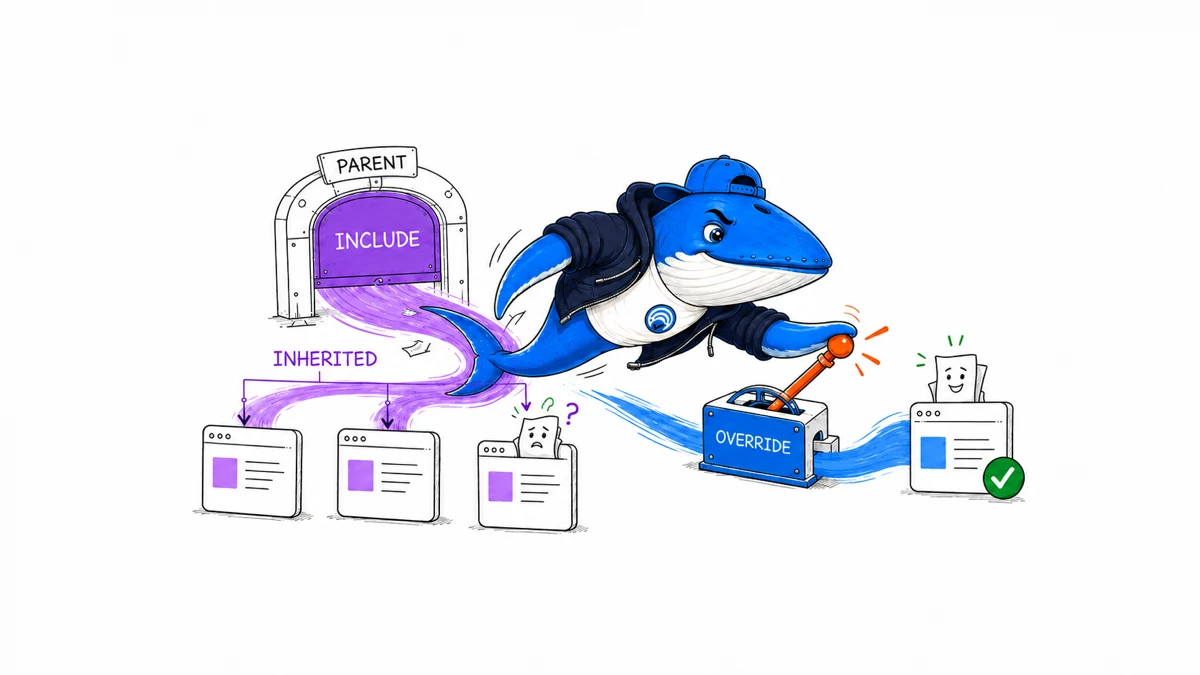
Direct answer: Google now gives every website worldwide a Search Console control for inclusion in AI Overviews, AI Mode, and generative AI features in Discover. Before changing it, inspect the site’s property hierarchy. A URL-prefix or subdomain property can inherit the choice made on a parent property, so one top-level change may affect more of the site than the person making it expects.
Excluding a site is not a neutral reporting preference. Google says the site’s links and content stop appearing in the covered generative-AI features, and the site stops receiving their traffic and impressions. The setting does not remove the site from ordinary Google Search and does not control AI training. Those jobs belong to different controls.
What Google rolled out worldwide
Google’s Search generative AI control documentation says the setting became available to all websites worldwide on August 31, 2026. Owners can find it under Settings → Search generative AI in Search Console.
The control offers three states:
- Include: the site’s links and content can appear in the covered features and help ground their responses. The site can receive impressions and traffic from them.
- Exclude: the site’s links and content are prevented from appearing in those features or contributing to their generated responses and previews. The site receives no traffic or impressions from them.
- Inherit from parent: the property follows the choice made by its controlling parent until an owner manually configures the child.
Include is the default for properties without a controlling parent. Inherit is the default when a parent property exists. The practical risk sits in that second default: the property open in Search Console may not be the property that determined the current state.
Exclusion trades eligibility for control
Choose Exclude only after the decision owner accepts the immediate consequence. Google says content from the site will no longer be eligible to appear as a link, ground an AI response, or contribute to a preview in the named Search generative-AI features. Other sites can still appear, including pages with similar information.
The setting applies to AI Overviews, AI Mode, and generative AI in Discover. Google says it may update that list as Search develops, so preserve the source date in the decision record and recheck the documentation later.
Exclusion also removes the measurement stream attached to that eligibility. If the site no longer appears in the covered features, it cannot receive their impressions or visits. That makes the pre-change export important: after exclusion, a flat line does not reveal the amount of visibility the site might otherwise have received.
How property inheritance changes the scope
Search Console properties form a hierarchy. A domain property such as example.com can be the parent of protocol, subdomain, and path properties beneath it. A URL-prefix property such as https://example.com/business/ can also be the parent of a narrower prefix such as https://example.com/business/cats/.
Google says a property inherits from its closest parent that has been manually configured to stop inheriting. If no parent has a manual setting, the property follows its top-level domain property. This means a closer configured URL prefix can interrupt the setting inherited from the domain.
| Property | Configured state | Effective state | Reason |
|---|---|---|---|
example.com | Include | Include | Top-level domain is manually configured |
https://example.com/ | Inherit | Include | Follows example.com |
https://example.com/licensed/ | Exclude | Exclude | Child has its own manual override |
https://example.com/licensed/archive/ | Inherit | Exclude | Closest configured parent is the licensed prefix |
These rows are an illustration of Google’s inheritance rules, not observed settings for a real site. Protocol and hostname matter for URL-prefix relationships. Do not assume http://, https://, www, and a bare hostname are interchangeable children.
Audit the property tree before making a change
Open the top-level domain property first, then inspect each deliberately verified subdomain and URL-prefix property used by editorial, commerce, product, legal, or regional teams. For each property, record both the selected state and the effective state. “Inherit” is a relationship, not the final answer.
- Inventory verified properties. Record the exact property string, including protocol, hostname, and path for URL-prefix properties.
- Identify the closest configured parent. Work upward until you find a parent with a manual Include or Exclude state.
- Name the business owner. A sitewide decision should not be inferred from access to one Search Console account.
- Map affected content. Separate editorial, licensed, user-generated, subscription, product, and regional areas when their participation rules differ.
- Preserve evidence. Save a dated screenshot or decision note without exposing account emails or unrelated private properties.
Use the downloadable Google AI Search control property audit CSV to record the hierarchy, intended state, owner, evidence, recheck, limitation, and rollback action. Its sample rows are marked EXAMPLE-REMOVE; delete or replace them before treating the file as a site record.
Do not ask one control to do four different jobs
The new setting is easy to confuse with crawler and snippet rules. Keep the desired outcome attached to the control that actually governs it.
| Control | Primary job | What it does not prove or control |
|---|---|---|
| Search generative AI control | Eligibility for links, grounding, responses, and previews in the covered Search generative-AI features | Ordinary Search inclusion or AI training |
noindex | Prevent a page from appearing in Google Search when Google can crawl and process the directive | A training-only preference while retaining Search visibility |
Google-Extended | Express Google’s documented preference for named Gemini training and grounding uses | Google Search inclusion or ranking; it is not a request user agent |
| Snippet controls | Limit how much page content can be used in supported Search snippets and previews | A universal exclusion from AI Search features |
The Google-Extended control guide explains the training and grounding boundary. Google’s snippet-control documentation covers nosnippet, max-snippet, and data-nosnippet. Neither replaces the Search Console inclusion choice.
Use a decision record, not an instinctive toggle
Include is usually the coherent choice when the site wants discoverability, citation opportunities, and measurable exposure in the covered features. Exclude may be justified when licensing, contractual, safety, or editorial rules prohibit this use. A narrow child-property override can be more proportionate than a domain-wide exclusion when the constraint applies to one section.
Before deciding, answer five questions:
- Which exact feature participation is allowed or prohibited?
- Does the rule cover the whole domain or a bounded section?
- Who has authority to accept the loss of visibility and traffic?
- Which parent or child property creates the intended scope?
- What evidence will show that the saved configuration matches the decision?
A preference about model training is not enough reason to change this setting, because Google documents training as a separate control. Likewise, dissatisfaction with AI traffic should not be converted into a sitewide exclusion without preserving a baseline and checking whether the report has enough impressions to support the conclusion.
A reversible change sequence
- Freeze the before state. Export the longest useful period from the Search Console generative-AI report. Record the property, filters, dimensions, date range, timezone, and export time.
- Confirm the intended scope. Check the parent chain and list the child properties that will inherit the change.
- Record the decision. Save the owner, reason, approved state, affected content, limitation, and rollback condition.
- Change one controlling property. Avoid simultaneous parent and child edits that make the effective source difficult to reconstruct.
- Verify the saved state. Reopen the parent and representative children. Confirm which ones inherit and which ones show a manual override.
- Wait for propagation. Google says exclusion normally takes effect within one or two days after the control goes live, although caching and propagation may take longer.
- Recheck without inventing causality. Record the visible configuration and report state. Do not claim a traffic effect from a short before/after line alone.
If the wrong scope was changed, restore the previous parent value or return an unnecessarily overridden child to Inherit. Keep the original record so the temporary state does not disappear from the audit trail.
Measure visibility without calling it traffic
The Search generative-AI performance report records impressions from AI Overviews and AI Mode. It does not expose prompts, citation counts, dedicated AI clicks, conversions, or the reason a page was selected. Google also provides a separate report for generative AI in Discover.
Use those reports to preserve the page, country, device, and time distribution that existed before a change. Pair them with analytics only as a separate outcome layer. The guide to Google AI impressions versus AI traffic explains why visibility and visits should not be added together or treated as the same metric.
A missing report does not prove zero AI visibility. Google says the property may lack enough eligible impressions, and exclusion itself can also remove reportable activity. The safest statement after a configuration change is narrow: the property showed this saved state on this date, and its reported impressions changed by this amount during a defined window. Another test is required before assigning cause.
Four failure states worth checking
- The wrong property was edited. A narrow URL-prefix view may still inherit from a manually configured parent.
- A child override was forgotten. A domain-wide change does not replace a closer manual setting on a child.
- The control was described too broadly. “Excluded from Google AI” is inaccurate when the action covers named Search features but not training or every Google product.
- The report was treated as a causal experiment. Demand, ranking systems, content changes, seasonality, reporting thresholds, and propagation can all change during the same period.
These are governance failures as much as technical ones. Give one person ownership of the property map and require editorial, legal, commerce, or product teams to document exceptions rather than applying silent overrides.
Questions publishers are likely to ask
Will exclusion remove my normal Google rankings?
Google says this control is not used as a ranking or inclusion signal for other parts of Search. A separate noindex directive is the documented method for preventing a page from appearing in Google Search completely.
Does exclusion stop Google from training AI on my content?
No. Google explicitly separates this Search feature control from AI training and points publishers to Google-Extended for the named model-training uses it documents.
Does it affect Merchant Center or Google Ads?
Google says the control does not override a publisher’s separate participation choices for services such as Merchant Center and Google Ads.
Can a child property choose a different state?
Yes. An owner can manually configure the child instead of inheriting. That child can then become the closest configured parent for properties nested below it.
Sources, method, and limits
This guide was prepared September 3, 2026 from Google’s current Search generative AI control, Search generative-AI performance report, and Discover generative-AI performance report documentation. Search Engine Answer translated the documented hierarchy into a reusable property audit and reversible change sequence.
No Search Engine Answer property was excluded as part of this article. The example hierarchy and CSV rows are illustrative. They do not establish traffic impact, ranking behavior, adoption, legal sufficiency, or how Google will extend the covered-feature list. Reopen the documentation before making a consequential change, and use the site’s editorial policy to keep documentation, observation, and inference separate.
For the broader discipline of improving visibility without invented guarantees, use the AI SEO guide. The immediate task here is narrower: map the property tree, choose the right control, and leave a record another owner can audit.
Keep learning
Continue this topic
Next in this topic
ChatGPT Enterprise Search Can Use Cached Results: What Publishers Should Test
Earlier in this topic
Rank Math Support Agent: Consent, Credentials & Cleanup
AEO & AI Search
Ask a question or join the discussion