Cloudflare AI Search Sync Jobs: Build a 32-Field Release Gate
Connect Cloudflare AI Search releases to external-source jobs, logs, source versions, sentinel retrieval, cache decisions and rollback.
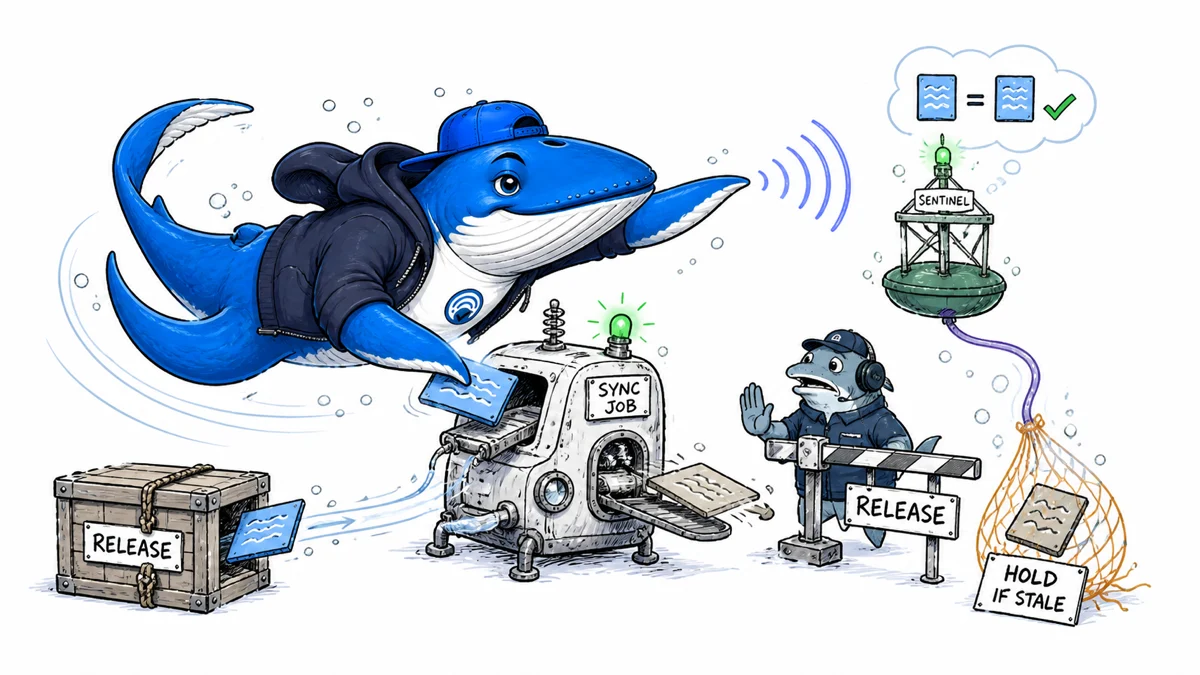
Direct answer: Triggering a Cloudflare AI Search sync from CI can shorten the delay between a content release and an external-source index refresh, but a successful job does not prove that the intended passage is retrievable. Join the deployment, sync job, logs, source version, and a predefined sentinel search in one release record.
This rebuilt guide ships a 32-field release-to-retrieval ledger. Its rows are marked EXAMPLE-REMOVE. The worksheet keeps failed attempts, retries, stale results, cache action, ownership, and the final release decision visible instead of letting a green deployment hide index staleness.
Scope the workflow to Cloudflare AI Search Beta and the source type
Cloudflare currently labels AI Search as Beta. Its syncing documentation distinguishes external website or R2 data sources from built-in storage. External sources use sync jobs. Files uploaded to built-in storage are processed individually and do not create those jobs.
Record the namespace, instance, environment, and data-source type before building automation. A job-based CI gate designed for a website crawler or R2 bucket should not wait for a job that built-in storage never produces. Recheck the documentation when the Beta contract or CLI changes.
| Source | Documented indexing behavior | Release evidence |
|---|---|---|
| Website | Scheduled or manually triggered sync job | Release, job, crawl/index logs, sentinel result |
| R2 bucket | Scheduled or manually triggered sync job | Object version, job, logs, sentinel result |
| Built-in storage | File processed when uploaded; no sync jobs | Upload response, item state, source version, sentinel result |
Use manual triggers to complement the schedule
For external sources, Cloudflare documents a six-hour default sync schedule. Supported intervals are 1, 2, 4, 6, 12, or 24 hours. A CMS webhook or CI step can create a job after a publish event instead of waiting for the next schedule, and programmatic triggers are limited to one every 30 seconds.
Do not trigger a new job for every file in one release. Debounce or batch events, persist the source version, and let one job represent the stable release. A job created while content is still changing can index a mixture of versions that no deployment manifest describes.
Create the release record before triggering the job
Write the release ID, commit or object version, deployment environment, completion time, AI Search namespace, instance name, source type, and owner to durable storage. Then trigger the job and append its ID. The shell output should not be the only place where the deployment and index refresh meet.
Cloudflare’s July 2, 2026 changelog documents Wrangler commands to create, list, inspect, cancel, and read logs for jobs. The commands accept --json; list and logs support pagination. Use structured output, validate its schema, redact credentials, and retain the raw response in a private build artifact.
| Artifact | What it establishes | What it cannot establish |
|---|---|---|
| Deployment manifest | Which source version reached the origin or bucket | That AI Search processed it |
| Sync job and logs | How the external-source indexing workflow ran | That a target passage is retrievable |
| Sentinel search | What one fixed query retrieved at a recorded time | Universal retrieval or answer correctness |
| Generated answer | What the configured generation path returned | Whether an error belongs to retrieval or synthesis without traces |
Poll a bounded set of terminal states
After creating the job, poll its documented state with a deadline and bounded interval. Preserve success, failure, cancellation, timeout, and an unknown-state branch. A pipeline that treats every non-success response as “still running” can wait forever; one that treats a network timeout as a failed index can create unnecessary duplicate jobs.
Keep the original job ID when retrying. Link the new job to the failed or cancelled attempt, record the reason and operator, and cap retries. Otherwise reliability reports retain the eventual success while deleting the failures that made the release risky.
- Confirm the deployment is stable and record its source version.
- Create one sync job and parse the structured response.
- Poll job details until a known terminal state or deadline.
- Collect all paginated logs and store them privately.
- Stop on unresolved file failures before running the sentinel.
Run a source-level sentinel after job success
Define the sentinel before deployment: a stable query, expected source, expected source version, and a pass condition. After job success, use a search operation to inspect the retrieved source or passage. Test retrieval before judging generated prose so an indexing failure does not get confused with prompt, reranking, citation-rendering, or model behavior.
A useful sentinel targets a changed fact that is specific enough to distinguish the new version from the old one. Record four separate outcomes: expected version retrieved, stale version retrieved, wrong source retrieved, or no result. A fluent answer that happens to contain the right words is not a retrieval pass unless the returned evidence meets the condition.
Account for inactivity pausing and response caches
Cloudflare says scheduled syncs for inactive external-source instances pause after 31 days without a search request. The instance remains searchable, but new source changes are not picked up until the schedule resumes through activity or manual control. An infrequently used staging instance can therefore return a convincing but stale result unless the release workflow checks indexing state.
AI Search also has similarity-cache controls. A source sync and a cached response are different layers. If the job processed the new version but a query still returns an older cached answer, record a cache decision separately. Purging or changing cache settings should follow the product’s current documentation and the release’s risk policy; do not use repeated source syncs to solve an unidentified cache problem.
| Observation | Likely layer to inspect | Decision |
|---|---|---|
| Job failed with file errors | Source access, format, size, or token | Hold and repair the named failure |
| Job succeeded; sentinel finds old version | Index item, query, source version, or cache | Hold; diagnose before retriggering |
| Sentinel passes; generated answer is wrong | Prompt, retrieval ranking, context, or generation | Keep indexing evidence and open a separate answer defect |
| Inactive instance paused | Scheduled indexing control | Resume or trigger, then establish a new baseline |
Give CI only the permissions and logs it needs
Cloudflare’s REST guide currently documents AI Search Edit and Run permissions for managing instances and sync jobs. Scope tokens to the intended account and environment, store them in the CI secret system, rotate them, and prevent authorization headers or private document content from entering general logs.
Job logs may contain file paths, source names, or failure detail that is useful operationally but inappropriate for a public build page. Save a restricted raw artifact and a redacted release summary. The public status should name the state and owner without exposing credentials or private source content.
Use the 32-field release-to-retrieval ledger
Download the Cloudflare AI Search release-sync ledger. Delete the EXAMPLE-REMOVE rows. Create one row per release and job attempt, retaining the relationship between retries. The fields cover environment, namespace, instance, source type, release and source versions, job state, file counts, sentinel expectation and result, cache action, owner, and next review.
Choose release only when the deployment, job, and sentinel meet the stated gate. Choose hold when evidence is missing or stale. Choose rollback when a sensitive release is exposed with wrong or unsafe retrieval. Choose degraded only when the application has a documented fallback and communicates the freshness boundary.
Keep private-index freshness separate from public crawling
A Cloudflare AI Search source sync is not evidence that Google, Bing, or an AI crawler fetched the public page. Public crawler policies, origin responses, and private retrieval indexes are separate control planes. The AI crawler guide explains crawler identities; the technical launch checklist covers public delivery and rollback.
When the sentinel passes, report exactly that: the expected source version was retrieved for the fixed query in the named instance at the recorded time. That is enough to release confidently within the gate without turning one successful observation into a universal quality claim.
Sources and method
- Cloudflare: AI Search syncing
- Cloudflare changelog: manage AI Search sync jobs with Wrangler
- Cloudflare: AI Search CLI
- Cloudflare: AI Search REST API
- SearchEngineAnswer editorial policy
The official documentation was rechecked on August 29, 2026. This guide defines a release method and provides illustrative ledger rows. It does not report a completed Cloudflare deployment, guarantee Beta stability, expose a reader’s instance, or claim that successful indexing proves answer accuracy.
Keep learning
Continue this topic
Next in this topic
You.com Web Search GET vs POST: Cacheability and Domain-Filter Semantics
Earlier in this topic
Claude Search-Result Blocks: Give First-Party RAG the Same Citation Contract as Web Search
Tools & Workflows
Ask a question or join the discussion