Claude Skill and Plugin Scanning: Build a 26-Field Release Gate
Map Claude's beta scan results and exclusions to permissions, pilot evidence, ownership, expiry and rollback with a 26-field release gate.
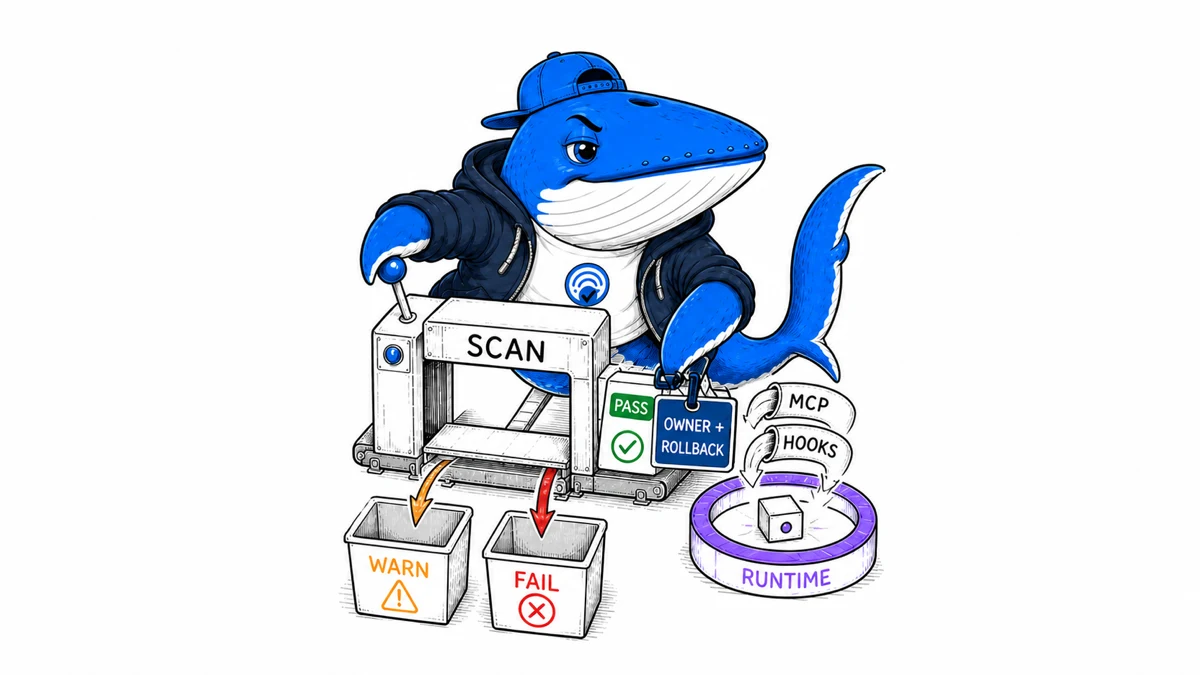
Direct answer: A Claude skill or plugin scan result is a package-level triage signal, not a complete security approval. Anthropic’s beta scanner checks newly uploaded or edited third-party packages for malicious content and returns pass, warn, or fail. It does not cover every delivery path, every existing installation, or unintended runtime behavior.
This guide turns those boundaries into a 26-field release gate. The worksheet keeps scan eligibility, result, permissions, delivery path, human review, pilot evidence, owner, expiry, and rollback separate. Its rows are examples marked EXAMPLE-REMOVE, not completed security assessments.
Define the scanner boundary before reading the badge
Anthropic’s skill and plugin scanning documentation describes a beta available on Enterprise plans in Claude, Claude Cowork, and Enterprise plugin marketplaces. Organization owners enable it; it is off by default. When enabled, it evaluates a third-party skill or plugin when someone uploads or edits it, before the package can run in that organization.
The scan looks for malicious content built to misuse the access a package receives. Anthropic says most scans finish in roughly one to two minutes and that identical packages can return cached results. The scanned copy is deleted after scanning, while the result and basic metadata are retained.
Those facts define a specific control point. They do not prove that every package in the organization was scanned, that a later dependency remains unchanged, or that a package will behave as the administrator expects.
Interpret pass, warn, and fail without upgrading the claim
| Result | Documented behavior | Release interpretation |
|---|---|---|
| Pass | The package installs normally when nothing concerning is found | Continue permission, provenance, and runtime review |
| Warn | The package remains usable behind an acknowledged caution banner | Require a named reviewer and documented exception decision |
| Fail | The package is blocked and cannot be used | Reject or repair the flagged package; do not bypass the path |
| Not scanned | No scanner result exists for this route or configuration | Apply the alternate control defined by policy |
Anthropic states that a pass means the scan did not find the covered kind of threat. It is not a guarantee that the package is safe in every respect, and it may not catch behavior that is unintended without being malicious. Preserve that wording boundary in internal approvals.
Map every documented exclusion to an alternate control
The current documentation excludes skills and plugins already present before scanning was enabled. It also excludes Claude-created skills, skills delivered through a connected MCP server, MCP servers themselves, and hooks. Organizations using customer-managed encryption keys, zero data retention, or HIPAA configurations do not receive this added scan under the documented beta.
An exclusion is neither a finding nor permission to ignore the package. It is a routing fact. Record why the item lacks a result, then assign a control that can actually inspect its source, permissions, network behavior, update path, or runtime effects.
| Delivery or state | Missing assurance | Alternate control |
|---|---|---|
| Pre-existing install | No new-upload scan record | Inventory, pin version, and re-review or controlled re-upload |
| MCP-delivered skill | Skill and server fall outside this scanner | Review server authorization, tool schema, logs, and remote content |
| Hook | Executable event behavior is not scanned here | Code review, least privilege, sandbox test, and monitoring |
| CMEK, ZDR, or HIPAA configuration | Beta scanning is unavailable | Follow the organization’s approved security-assessment process |
Preserve package identity and provenance
A result is meaningful only when it can be tied to the artifact reviewed. Record the package name, version, source URL or marketplace, publisher, retrieval time, file hash, uploader, delivery path, and whether later updates are pinned or automatic. If the platform returns only basic scan metadata, keep the additional provenance in your own register.
Do not equate an official-looking name with operator ownership. Confirm the marketplace and publisher identity. For a custom upload, retain the original archive in controlled storage. For a repository source, record the immutable commit or release identifier rather than a moving branch name.
Re-run the gate after any material edit, dependency change, publisher transfer, permission expansion, or delivery-path change. A cached result for identical content can be useful, but it does not cover a different package or changed runtime environment.
Review effective permissions, not the package description
Read the instructions, manifest, scripts, hooks, bundled skills, connector definitions, referenced remote resources, and installation steps. Map which files, prompts, tools, accounts, services, and network destinations the package can reach. Include permissions inherited from Claude, Cowork, local MCP processes, a connected service, or the operating system.
A package can be useful and still request more access than its reader job needs. It can also behave safely in a fixture while a connected account exposes sensitive production data. Test with the least privileged account and synthetic inputs. Keep authorization tokens, customer content, private prompts, and raw logs out of the public worksheet.
The plugin-use documentation notes that plugins can bundle skills, connectors, sub-agents, hooks, and local MCP servers, with component availability differing between chat and Cowork. Record the components actually installed; the plugin title is not a permission model.
Run a bounded pilot before organization-wide release
- Freeze the package identity and scanner result.
- Use a test workspace, least-privileged account, and non-sensitive fixtures.
- Exercise the normal task, invalid input, cancellation, unavailable dependency, and denied permission.
- Observe tool calls, file changes, network destinations, errors, stored artifacts, and user-visible output.
- Verify the disable and removal path before expanding access.
- Set a pilot end date and a reviewer who can stop the release.
This is a functional and governance pilot, not proof that every adversarial condition was tested. Record what the environment could observe and what remained invisible. If the package makes remote calls that the pilot cannot inspect, keep that limitation beside the approval.
Use the 26-field release gate
Download the Claude skill and plugin release gate. Each row represents one package version in one organization and delivery path. Remove or replace every row labeled EXAMPLE-REMOVE; the included values demonstrate the method and are not security findings.
The record forces four decisions that a badge cannot carry: whether the scanner applied, what access the package receives, what the pilot observed, and who owns the exception or rollback. Use stable aliases rather than customer names or account identifiers in a public example.
| Decision | Required evidence | Typical duration |
|---|---|---|
| Reject | Fail result, untrusted provenance, or unacceptable access | Until the package changes and is reassessed |
| Hold | Missing owner, review, identity, or test evidence | Until the named gap closes |
| Pilot | Bounded account, fixtures, monitor, and rollback | Fixed trial period |
| Approve with expiry | Completed review and acceptable residual risk | Until the next version or review date |
Monitor the runtime and rehearse revocation
Track unexpected tool use, access denials, external requests, errors, user complaints, permission changes, new dependencies, publisher changes, and package updates. Set a review date even for an unchanged package because connected services and organizational policy can move.
The removal path should identify the organization owner, user-installed copies, connected accounts, retained files, scheduled work, local processes, and credentials that need revocation. Removing a marketplace listing or toggling a package off may not clean up everything it created.
Use the SearchEngineAnswer evidence standard when a package contributes research or publishable text. A security release decision does not verify the factual accuracy, originality, citations, or disclosure quality of its output.
Sources and method
- Anthropic: get started with skill and plugin scanning
- Anthropic: provision and manage organization skills
- Anthropic: manage plugins for an organization
- Anthropic: use plugins in Claude
- SearchEngineAnswer: run a bounded small experiment
Documentation was rechecked on August 29, 2026. This article maps the documented beta boundary to a reusable governance worksheet. It does not claim access to a Claude Enterprise organization, independently test Anthropic’s scanner, or certify any package as safe.
Keep learning
Continue this topic
Next in this topic
Claude inference_geo: Separate Inference Location from Data at Rest
Earlier in this topic
Gemini Imagen Shutdown: Migrate Image Tools Before August 17
Tools & Workflows
Ask a question or join the discussion