Brave Search MCP for Claude: Preserve Retrieval Evidence and Citation Provenance
Brave documents a Claude and Bedrock MCP workflow for live search. Preserve the request, generated query, raw response, selected evidence, and final citation separately.
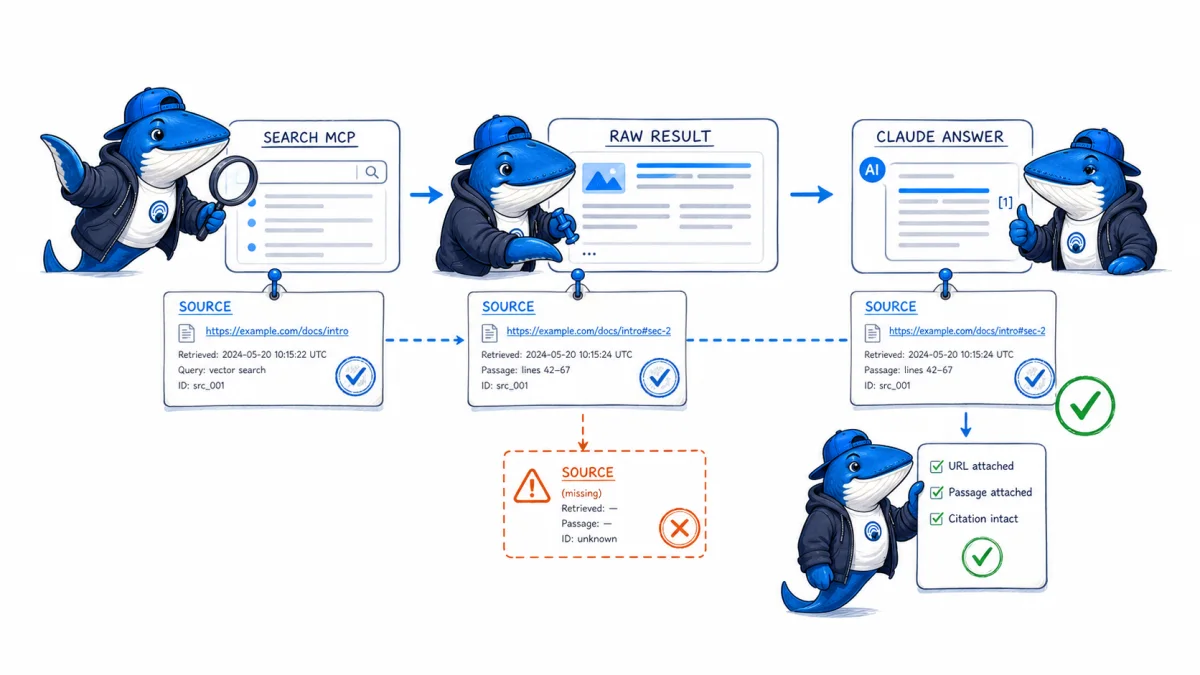
Published August 10, 2026: Brave’s June 29 guide documents a workflow that connects Claude Cowork on Amazon Bedrock to Brave Search through an MCP server. The setup can expose live web results and source URLs, but a final citation is only the end of a longer evidence chain.
To make the work auditable, preserve five layers separately: the user request, any generated search query, the Brave response, the evidence selected for the model, and the final interpretation or citation. A sourced answer can still omit rejected results, lose request parameters, or overstate what the cited page supports.
What the official guide establishes
Brave describes a local MCP server that provides web, news, local, and AI-oriented result data from the Brave Search API, while Claude inference runs through the user’s Amazon Bedrock environment. The guide says the Brave API key is stored in the MCP server configuration and that the user approves tool use.
The article also attributes an index size of more than 40 billion pages to Brave. That remains a vendor claim, not an independently reproduced coverage measurement. API output and the Brave consumer search page are separate product surfaces.
| Layer | Save | Common loss |
|---|---|---|
| User request | Exact task, constraints, time, workspace | The final answer hides the original scope |
| Tool request | Generated query, API method, parameters, permission | Query rewriting is invisible |
| Search response | Status, timestamp, ordered results, URLs, snippets, raw output | Only selected citations survive |
| Selection | Included and rejected sources with reasons | Cherry-picking cannot be audited |
| Interpretation | Claim, source passage, boundary, confidence | A real URL is mistaken for adequate support |
Create a provenance manifest
{
  "run_id": "2026-08-10-brave-001",
  "user_request_hash": "...",
  "tool": "brave-search-mcp",
  "tool_version": "record-installed-version",
  "query": "record-the-generated-query",
  "parameters": {"count": 10},
  "retrieved_at_utc": "...",
  "raw_response_sha256": "...",
  "selected_sources": [],
  "claim_ledger": []
}
The manifest does not contain the API key, AWS credentials, bearer tokens, cookies, or private document content. Store secrets in the approved credential system. Use a stable internal identifier if repeated runs must be connected.
Save raw results before the model summarizes them. Preserve errors, timeouts, zero-result queries, and pagination. Removing failures makes the workflow appear more reliable than the actual retrieval layer.
Verify each selected source
- Open the canonical URL, not only the search snippet.
- Confirm the issuing organization owns the claimed fact.
- Record publication and update dates, product version, region, plan, and release state.
- Map the exact claim to a passage, field, dataset row, or direct observation.
- Separate verified fact, vendor claim, calculation, inference, and unresolved point.
- Check competing explanations and a second primary source when the decision warrants it.
- Reopen unstable sources immediately before publication.
Use the evidence-led publishing guide for the claim ledger and the source-bounded AI brief workflow before drafting. Retrieval speed does not lower the evidence standard.
Test the installation without overclaiming
Brave’s guide includes a Claude desktop configuration using an MCP server package and a Brave API key. Because desktop paths, packages, marketplace offers, Bedrock regions, model access, and pricing can change, reopen the official guide and current product documentation before copying configuration into production.
- Confirm the MCP server is running and reports the expected version.
- Use a recent fact with a known primary source and record the generated query.
- Compare the raw Brave response with the sources Claude cites.
- Inject a contradictory secondary source and check whether the workflow surfaces the conflict.
- Remove tool permission and verify the agent does not imply that a live search occurred.
- Rotate the API key after any exposure and verify that logs do not contain it.
A passing setup test proves that one documented environment completed the workflow. It does not prove complete web coverage, permanent pricing, or superior research quality.
Keep learning
Continue this topic
Next in this topic
Perplexity Router API vs Agent API: Which Provides Web Grounding?
Earlier in this topic
WordPress 7.1 SEO and Performance Preparation Checklist
Tools & Workflows
Ask a question or join the discussion