Search and AI Changes: August 24–30, 2026
Five search and AI changes from August 24–30, covering signed-in browsing, AI Overview expansion, local bookings, source labels and reporting errors.
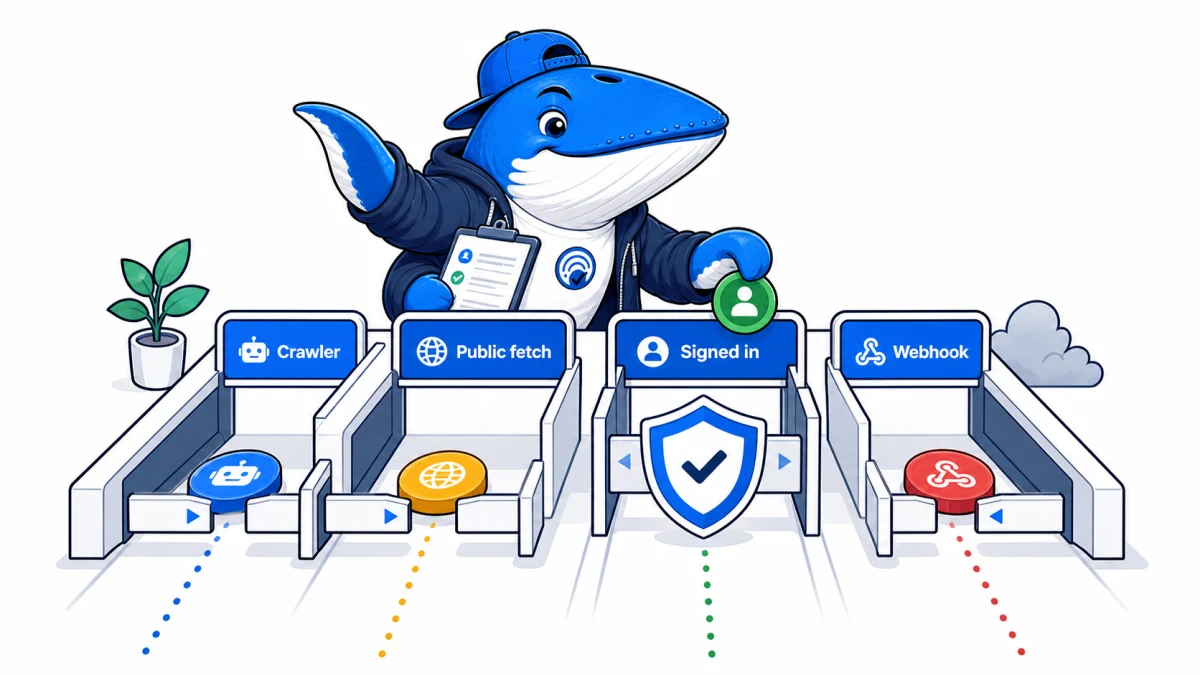
Direct answer: This briefing consolidates 5 related search and AI changes into one decision-focused report. It preserves the underlying facts, source links, checks and downloads without making readers open 5 short articles.
These five changes all complicate attribution. A signed-in agent, expanding answer surface, booking handoff, domain-level source label or logging error can create activity that looks like ordinary search traffic but is not directly comparable with it.
What changed this week
| Change | What it affects | Best next check |
|---|---|---|
| ChatGPT Work Can Sign Into Websites: What Publishers Should Measure | ChatGPT Work can help on some signed-in websites after the user enters credentials. Publishers should distinguish crawler, public fetch, signed-in session, and webhook traffic. | OpenAI says ChatGPT presents the login screen while the user enters credentials and security codes. |
| Google AI Overviews Can Expand Before You Scroll | Some Google AI Overviews can expand automatically before a user scrolls. Measure the pixel displacement and first-organic visibility instead of relying on rank position alone. | Google says expansion stops after the user begins scrolling so the page does not keep moving under them. |
| ChatGPT Restaurant Reservations: Local Search Guide | ChatGPT now connects restaurant questions to reservation availability through OpenTable, Resy, and Yelp. Selection, inventory, and completed bookings remain separate outcomes. | OpenAI documents OpenTable globally, Resy in the US, and Yelp in the US and Canada. |
| Perplexity Source Labels Apply to Domains, Not Every Page or Claim | Perplexity’s Government, Academic, and Trusted labels provide domain-level context. They do not endorse every page, verify every claim, or promise citation visibility. | Perplexity warns that the cue does not validate every page or claim on that site. |
| Google AI Search Console Logging Error: Aug 13–17 | Google says a Search Console logging error underreported Generative AI impressions from August 13 through August 17. It was a reporting issue, not an actual traffic decline. | Google says Generative AI impressions were underreported during this bounded period. |
Originally reported 2026-08-29
ChatGPT Work Can Sign Into Websites: What Publishers Should Measure
Why it matters: ChatGPT Work can help on some signed-in websites after the user enters credentials. Publishers should distinguish crawler, public fetch, signed-in session, and webhook traffic.
Next check: OpenAI says ChatGPT presents the login screen while the user enters credentials and security codes.
Direct answer: ChatGPT Work can now continue some browser tasks after the user signs in to a website. That is a user-authorized authenticated session. It should not be grouped automatically with anonymous ChatGPT Search retrieval, crawler access, model training, or a cited referral.
Publishers need an access-state record that keeps identity, consent, data scope, and measurement separate. Blocking every unfamiliar automated browser can also block a task the user intentionally started.
What OpenAI announced
OpenAI’s August 25, 2026 ChatGPT release notes say ChatGPT Work’s browser on web and mobile can help on some websites that require sign-in. When authentication is supported, ChatGPT presents the login screen so the user can enter credentials and any security code.
OpenAI says the model cannot see the username or password, those credentials are not stored by ChatGPT, and the browsing session may remain signed in for future tasks. Users can delete browser data. The feature is available to Plus and Pro users, and consequential actions such as a reservation or payment still require confirmation.
The release notes do not publish a list of compatible sites, browser user agent, IP ranges, log signature, or analytics classification. Those details must remain unknown until documented or directly observed.
Four access states publishers should keep separate
| State | Authentication | Primary decision | Do not infer |
|---|---|---|---|
| Search or training crawler | Normally none | Robots and network access policy | That a fetched page was cited or used for training |
| User-triggered public-page retrieval | Public access | Rate, attribution, and content availability | That it is an ordinary Google or ChatGPT referral |
| ChatGPT Work browser session | User enters credentials | Consent, authorization, session scope, and confirmation | That private content is searchable by everyone |
| Webhook-triggered task | Connected app and task permissions | Trigger scope, data minimization, and action approval | That a website crawler initiated the task |
The distinctions echo the crawler boundary in the search, agent, and training bot policy. A request proves access to a resource at a moment in time; it does not by itself prove indexing, training, answer use, citation, or conversion.
A publisher security and consent audit
- Map authentication boundaries. Identify which pages, APIs, exports, and actions become available after sign-in.
- Check session scope. Confirm that one account cannot expose another user’s resources and that session expiry works as intended.
- Require confirmation for consequences. Purchases, reservations, submissions, deletions, and account changes need an explicit final step.
- Preserve accessible controls. Login, consent, verification, and confirmation flows should work through semantic labels and keyboard navigation.
- Log the minimum useful evidence. Record timestamps, route, action result, session identifier, and security outcome without placing passwords or sensitive form values in logs.
- Test rate and abuse controls. Protect the service without assuming every automated browser is hostile or every signed-in session is safe.
The small-experiment method explains how to freeze page representations and record which controls an agent could use. For signed-request systems, the Web Bot Auth guide covers a different verification model and should not be presented as proof of a ChatGPT Work session.
Analytics needs a new label, not a guessed channel
A signed-in browser task may look like direct traffic, a browser referral, or another client pattern depending on implementation. OpenAI has not documented the classification. Do not relabel sessions as “ChatGPT Search” solely because an agent completed the task.
Create a temporary operational segment such as “authenticated agent session: unverified client identity” only when server-side evidence supports it. Record the rule and keep it out of executive AI-referral totals until the client identity is verified.
Measure the task as a sequence: authentication started, authentication succeeded, resource opened, action prepared, user confirmation requested, and action completed. A completed login is not a completed conversion.
What this does not open to search
The feature does not make private pages publicly indexable. It does not say ChatGPT Search can enter arbitrary accounts, bypass access controls, or retrieve credentials. The user initiates the task and enters authentication information through the surfaced login flow.
Publishers should continue to apply least privilege, session expiry, multi-factor authentication, action confirmation, and audit logging. The product announcement changes the browser task that a user can authorize; it does not remove the website’s responsibility to enforce permissions.
Sources, method, and limits
Source: OpenAI’s August 25 ChatGPT release notes covering signed-in websites, credential handling, browser-data controls, consequential-action confirmation, and plan availability.
Method: We separated four access states and mapped each one to a distinct publisher security and measurement decision.
Limits: No authenticated production-site test was performed. OpenAI does not document client identifiers, site coverage, publisher analytics treatment, or universal compatibility.
Originally reported 2026-08-29
Google AI Overviews Can Expand Before You Scroll
Why it matters: Some Google AI Overviews can expand automatically before a user scrolls. Measure the pixel displacement and first-organic visibility instead of relying on rank position alone.
Next check: Google says expansion stops after the user begins scrolling so the page does not keep moving under them.
Direct answer: Google says some AI Overviews can expand automatically while a searcher remains at the top of the page. Once the person starts scrolling, the expansion stops so the page does not continue moving beneath them.
For publishers, this creates a measurement problem. A result can keep the same reported position while moving farther below the initial viewport. Measure the pixels and interface state before estimating any visibility effect.
What Google said about the expansion
On August 28, 2026, Search Engine Roundtable reported Google’s explanation of the behavior. Google said AI Overviews may dynamically expand for some queries when its systems find the additional detail useful. If the user starts scrolling, Google stops the expansion to preserve that person’s place.
Observed versions can reveal more answer text and an “Ask anything” prompt without requiring a manual “Show more” click. This is query-dependent interface behavior, not a documented ranking-system change.
Google has not published the eligible query classes, expansion timing, rollout percentage, or click-through effect. A screenshot can verify one interface state; it cannot establish a traffic result.
Position does not measure the viewport
Average position describes where a result sits within Google’s reporting rules. It does not describe how many pixels of AI answer, shopping modules, images, prompts, or other features appear above the link. Two observations can report the same position and give the result very different visual exposure.
| Field | What to capture | Why it matters |
|---|---|---|
| Viewport | Width, height, zoom, device scale | Defines the visible area |
| AI Overview height | Pixels before and after expansion | Measures the added displacement |
| First organic result | Top-edge vertical coordinate | Shows whether it remains above the fold |
| Expansion state | Collapsed, expanding, expanded, stopped by scroll | Prevents unlike screenshots from being compared |
| Source links | Count, presentation, and vertical position | Separates answer growth from publisher-link exposure |
Run a repeatable viewport test
- Choose a fixed query list and record whether each query produced an AI Overview in the baseline.
- Use one viewport, browser version, locale, device class, and signed-in state per test cell.
- Capture the page immediately after load, during any expansion, and after the interface settles.
- Do not scroll until the expansion window has been recorded. Then repeat with an immediate scroll to test the stop behavior.
- Measure the AI Overview container and the first organic result’s vertical coordinate.
- Repeat across logged-out or fresh state, normal account state, mobile, and desktop where available.
Save video or timestamped screenshots only when they come from the stated environment. Do not recreate a Google interface as evidence. The output should be a table of measured interface states, not a chart with estimated CTR.
What Search Console can and cannot show
Google’s generative-AI reporting can help compare impressions and clicks over time, but it does not identify whether a particular impression used the dynamic expansion state. It also does not report the height of the AI Overview or the pixel position of the first organic link.
Use the Generative AI report guide for the documented metric boundaries, then reconcile it with analytics using the AI impressions versus traffic workflow. Treat the viewport test as a separate interface dataset.
If clicks fall while measured pixel displacement increases, the two observations are consistent with a visibility explanation. They still do not prove causation without a suitable comparison period and control for query demand, ranking, snippet changes, and other SERP features.
The publisher decision
Do not rewrite pages merely because one AI Overview became taller. Keep answering the query clearly, support consequential claims, and make the source useful when a searcher chooses to click. The immediate operational change is measurement: add viewport state to any SERP-observation protocol.
Google’s confirmation supports the existence of dynamic expansion and its scroll-stop behavior. It does not support a universal rollout claim, a ranking conclusion, or a percentage loss in organic traffic.
Sources, method, and limits
Source: Search Engine Roundtable’s August 28 report containing Google’s explanation of the dynamic expansion and scroll-stop behavior.
Method: We translated the interface claim into a pixel-displacement protocol that keeps ranking, viewport exposure, source links, and clicks separate.
Limits: No cross-query sample or CTR study has been run for this article. Google has not published eligibility, rollout, or traffic data for the feature.
Originally reported 2026-08-29
ChatGPT Restaurant Reservations: Local Search Guide
Why it matters: ChatGPT now connects restaurant questions to reservation availability through OpenTable, Resy, and Yelp. Selection, inventory, and completed bookings remain separate outcomes.
Next check: OpenAI documents OpenTable globally, Resy in the US, and Yelp in the US and Canada.
Direct answer: ChatGPT can now move from a restaurant question to a reservation flow through OpenTable globally, Resy in the United States, and Yelp in the United States and Canada. OpenAI says the experience is available across Free, Go, Plus, Pro, Business, and Enterprise plans on mobile, web, and desktop; ChatGPT Work is excluded. The announcement does not disclose how restaurants are selected or ordered.
What OpenAI launched
OpenAI added restaurant reservations to the ChatGPT release notes on August 10, 2026. A user can ask for a restaurant, review suggested options and available reservation times, then continue through a supported booking partner.
| Partner | Documented geography | Role |
|---|---|---|
| OpenTable | Global | Reservation availability and booking flow |
| Resy | United States | Reservation availability and booking flow |
| Yelp | United States and Canada | Restaurant information and booking flow |
The feature joins discovery, inventory, and transaction steps that were previously easier to measure separately. A restaurant can be known to ChatGPT yet have no visible slot. A slot can exist at a partner while the restaurant is absent from a particular shortlist.
Four states in the booking funnel
- Entity understood: ChatGPT can reconcile the restaurant’s name, location, cuisine, website, and listing records.
- Shortlist selected: The restaurant appears for a specific request and context.
- Slot available: A supported provider returns inventory for the requested party, date, and time.
- Booking completed: The user continues to the provider and finishes the reservation.
Measure each state. A single “AI visibility” score cannot reveal whether the constraint is entity data, recommendation relevance, inventory, or booking completion.
OpenAI has not published the selection formula, ordering factors, provider precedence, or attribution window. A prominent result is an observation for that prompt, user, place, and time; not proof of a general ranking position.
A local entity and inventory audit
- Identity: Keep the canonical name, address, phone, coordinates, cuisine, price range, and opening hours consistent across the website and major listings.
- Official page: Give each location a crawlable page with menu context, accessibility details, neighborhood, reservation link, and accurate temporary closures.
- Provider record: Verify the supported booking profile, time zone, party-size rules, inventory release, and cancellation policy.
- Structured data: Use valid Restaurant or LocalBusiness markup that agrees with visible page content. Markup does not guarantee selection.
- Evidence: Maintain recent menus, first-party photography, press references, and clearly attributed reviews or awards.
After a rebrand, relocation, or domain migration, test old and new names. Conflicting entity records can produce duplicate restaurants, stale addresses, or a recommendation that leads to the wrong booking profile.
A repeatable restaurant test
Create 20 prompts that represent real decisions: cuisine plus neighborhood, dietary need, group size, price ceiling, outdoor seating, accessibility, late availability, and a named-restaurant query. Run each in a fresh conversation three times at fixed local times.
Record the plan, model, account state, approximate location, precise-location permission, device, prompt, shortlist order, displayed facts, cited sources, provider, available slot, price or deposit, and final destination URL. Repeat from at least two markets if the business operates in both.
Use one control restaurant with similar location and inventory. If both disappear, the change may be provider or feature availability. If only one disappears, inspect entity and inventory differences before attributing the result to “ChatGPT SEO.”
Do not automate a booking or create inventory solely for testing unless the provider allows it. The useful endpoint is an available flow, not a false reservation that harms restaurant operations.
What this means for local search
The feature narrows the distance between an answer and a commercial action. Publishers and local businesses should expect the answer surface to combine descriptive content with live partner data. Owning the best article is not enough if the booking record is incomplete; having inventory is not enough if the entity cannot be reconciled.
The defensible strategy is coordinated data: accurate first-party pages, consistent listings, supported provider inventory, and measurement that preserves prompt context. Avoid claiming that schema, reviews, or a provider partnership guarantees placement. OpenAI has not made that promise.
Sources, method, and limits
Source: OpenAI’s official ChatGPT release notes, including the documented plans, clients, partners, and regions.
Method: We separated entity recognition, shortlist inclusion, live availability, and completed booking, then designed a test that records each state.
Limits: OpenAI has not disclosed ranking factors, provider coverage by city, result-order rules, attribution, or conversion reporting. Availability can vary by restaurant, time, party size, location, account, client, and rollout.
Originally reported 2026-08-29
Perplexity Source Labels Apply to Domains, Not Every Page or Claim
Why it matters: Perplexity’s Government, Academic, and Trusted labels provide domain-level context. They do not endorse every page, verify every claim, or promise citation visibility.
Next check: Perplexity warns that the cue does not validate every page or claim on that site.
Direct answer: Perplexity’s Government, Academic, and Trusted labels describe a source domain, not the accuracy of an individual page or claim. A label is a context cue, not an endorsement, ranking guarantee, or citation signal. Publishers should audit whether their domain-level disclosures make the label understandable without assuming it changes visibility.
How Perplexity defines the labels
Perplexity’s source-label documentation, updated August 7, describes three labels:
- Government: an official government organization or agency.
- Academic: an educational institution or academic organization.
- Trusted: a domain that meets Perplexity’s stated publication-quality criteria.
For the Trusted label, Perplexity says it asks whether the publication discloses corrections, identifies authors, and separates news from advertising or opinion. The label applies at domain level. Perplexity explicitly warns that the label does not validate every page or claim on that domain.
The documentation also says partnerships and payments do not determine labels. A source without a label is not necessarily low quality, and a labeled source is not endorsed by Perplexity.
Domain, page, and claim are different levels
| Level | What can be evaluated | What the label establishes |
|---|---|---|
| Domain | Ownership, corrections, authorship, editorial separation | The label’s stated scope |
| Page | Date, author, evidence, conflicts, method, updates | Nothing automatically |
| Claim | Whether the cited source supports the exact statement | Nothing automatically |
A government domain can publish an outdated PDF. An academic institution can host a student page. A newsroom with sound corrections can publish opinion, sponsored content, or a mistake. Readers and answer systems still need to inspect the cited page.
This distinction matters in AI answers because a compact label can look like a quality score. Perplexity’s own wording is narrower: it gives context about a source domain.
A publisher disclosure audit
Whether or not Perplexity assigns a label, these checks improve reader accountability:
- Ownership: Name the legal or operating entity, the editorial leadership, and a working contact route.
- Corrections: Publish a visible policy and show how meaningful corrections are dated on the affected page.
- Authors: Use stable author pages with relevant expertise, recent work, and contact or profile links.
- Commercial separation: Mark advertising, affiliate relationships, sponsored material, and opinion in language a reader can understand.
- Evidence: Link important claims to primary material and describe tests, sample sizes, dates, and limitations.
- Freshness: Preserve publication dates, add meaningful update dates, and remove claims that can no longer be verified.
Run the audit on the mobile page, not only the policy documents. Disclosures that are technically present but hidden behind unclear labels or obstructive overlays do not help a reader evaluate a claim.
How to test whether labels affect visibility
Perplexity does not state in the help article that a source label changes ranking, retrieval, or citation probability. A correlation study should therefore avoid turning the label into the assumed cause.
Build a fixed prompt set and record every cited domain, label, citation position, answer claim, source type, query intent, date, account state, and model. Compare labeled and unlabeled domains only after controlling for authority, topical relevance, page freshness, content type, and the number of eligible pages.
A before-and-after comparison is difficult because labels can be added at the same time that Perplexity changes retrieval or the web changes. The stronger experiment uses matched domains and repeated prompts. Even then, the result shows association unless the system’s treatment can be isolated.
Do not redesign a publication solely to obtain a badge. Improve disclosures because they reduce ambiguity and help readers; measure any visibility effect separately.
Questions the current documentation leaves open
- How frequently are domains re-evaluated?
- Can a publisher request review or correct an inaccurate label?
- How are mixed platforms, user-generated sections, and hosted subdomains handled?
- Does the label appear on every product surface and in every region?
- Is label status used anywhere in retrieval or ranking?
These are unresolved based on the published help article. Absence of documentation is not evidence that the feature has no internal use, but it is also not permission to advertise an SEO benefit.
Sources, method, and limits
Source: Perplexity’s official “Understanding Source Labels” help article, updated August 7, 2026.
Method: We mapped every documented label claim to its stated domain-level scope, then built a publisher audit that can be completed without assuming a ranking benefit.
Limits: Perplexity does not publish the complete classification process, review cadence, domain inventory, or any label-to-citation experiment. Label presentation and coverage can change by product surface.
Originally reported 2026-08-29
Google AI Search Console Logging Error: Aug 13–17
Why it matters: Google says a Search Console logging error underreported Generative AI impressions from August 13 through August 17. It was a reporting issue, not an actual traffic decline.
Next check: Google says Generative AI impressions were underreported during this bounded period.
Direct answer: Google says a logging error caused Generative AI impressions in Search Console to be underreported from August 13 through August 17, 2026. The incident affected reporting, not actual search traffic. Google also lists a separate August 13 Discover reporting issue. Do not use those dates to calculate an AI-visibility loss or retroactively inflate the data.
What Google recorded
Google’s Search Console data anomalies page lists a Generative AI performance-report logging error from August 13 to August 17. Google says the error caused a decrease in reported impressions and did not reflect an actual change in search traffic.
The same page lists an August 13 Discover logging error that reduced reported clicks and impressions, including Generative AI impressions in Discover. Google does not provide the number of affected properties, the percentage missing, or a correction factor.
| Surface | Dates | Reported impact | What Google says did not change |
|---|---|---|---|
| Generative AI in Search | August 13–17 | Reported impressions decreased | Actual search traffic |
| Discover, including Generative AI | August 13 | Reported clicks and impressions decreased | The note describes a logging error |
What the note does not prove
The anomaly does not establish that every property lost data, that all five days are equally incomplete, or that clicks and impressions were affected by the same proportion. It does not reveal how Google assigns an impression to a generative surface.
It also does not explain a decline that starts before August 13 or continues after August 17. When a graph spans the incident boundary, compare the affected segment with adjacent dates and with unaffected dimensions rather than labeling the whole movement a reporting error.
Because Google supplied no denominator, multiplying the missing period by an average uplift would create false precision. Keep the recorded values and attach an anomaly label.
How to annotate the data
- Preserve the raw export. Save the unmodified daily Search Console data and the time of export.
- Mark August 13–17. Add a reporting-anomaly field rather than overwriting impressions.
- Keep surfaces separate. Search Generative AI and Discover have different incident ranges in Google’s note.
- Exclude the period from rate comparisons. Do not use it as a clean baseline for impression growth, click-through rate, or visibility-share changes.
- Retain independent observations. Referral sessions, server logs, rank captures, and saved answer citations can provide context, but they are not a substitute for the missing Search Console denominator.
If Google later republishes or backfills the data, store a second export and compare the files. Until then, “unknown because of logging” is more accurate than an estimated correction.
Why impressions and traffic must stay separate
An impression is a platform-defined exposure event; a click or referral is a visit event. They answer different questions. Our guide to Google AI impressions versus AI traffic explains why a visibility line can rise without matching referral growth.
This incident adds a third state: the exposure may have occurred, but the measurement was not logged correctly. A reliable report should distinguish a behavioral change, a measurement change, and an unknown cause.
For executive reporting, use one sentence: “Google underreported Generative AI impressions August 13–17; the period is excluded from trend conclusions.” That is more useful than smoothing the line and hiding the uncertainty.
Sources, method, and limits
Source: Google Search Console’s official data-anomalies record, accessed August 29, 2026.
Method: We preserved Google’s stated dates and affected metrics, then designed an annotation procedure that does not invent missing values.
Limits: Google has not published the scale, affected-property count, query distribution, correction status, or technical cause. The incident note supports a reporting caveat, not an estimate of lost impressions.
What I would do first
Choose the one change that can alter a measurement, crawl path, conversion or publishing control you already use. Save the current state, run one bounded comparison and document the result before changing the next variable. Items that do not touch an active workflow can stay on the watchlist.
Keep learning
Continue this topic
Next in this topic
Cloudflare /crawl Now Enforces Content Signals: Test reference vs full
Earlier in this topic
Google AI Mode Adds Link Carousels for Developing Topics
AEO & AI Search
Ask a question or join the discussion