How Google Chooses Image Thumbnails for Search and Discover
Use consistent preferred-image metadata, crawlable 1200-pixel sources, and crop-safe composition to improve image eligibility without assuming Google must select your asset.
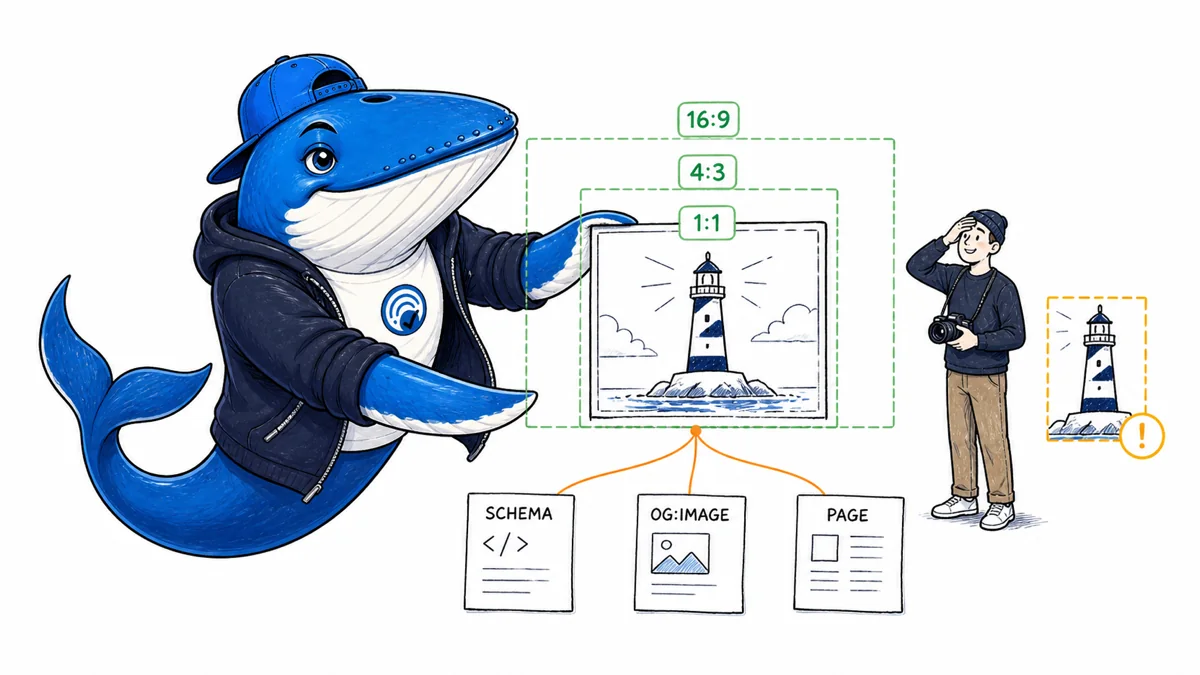
Published August 9, 2026: Google’s March 2026 documentation update explains that image metadata such as structured data and og:image can help Google identify a preferred image for Search and Discover. Google can still select another relevant image, and the image may be cropped for different surfaces.
The practical job has two parts: make the preferred source easy to identify, then design it so the essential subject survives common crops. Metadata is a preference signal, not a guarantee; crop safety is a production property, not an SEO tag.
Where Google can find the preferred image
Use a crawlable, indexable image that is visibly relevant to the page. Reference it consistently in the page’s applicable structured data and social metadata. Keep the URL stable, return an image content type, avoid blocking Googlebot-Image, and include the image near the content it represents.
For articles, use the image property in Article structured data. For products, use the relevant Product image. og:image can provide another preference signal. The visible HTML image remains important; a metadata-only asset that never appears in the content can create an avoidable relevance conflict.
Build a crop-safe master
| Crop | Keep | Move out of risk zones |
|---|---|---|
| 16:9 | Main subject, decisive action, and sufficient context | Tiny captions and decorative edge objects |
| 4:3 | Subject identity and central relationship | Important evidence at far left or right |
| 1:1 | Face or primary object plus the action that explains the story | Multi-step meaning that depends on the full width |
Start with a large source image—Google recommends images at least 1,200 pixels wide for Discover and permits large previews when the page allows them. Keep the decisive subject inside a central square-safe area. Use text in HTML rather than baking the headline into the artwork; generated thumbnails can crop or shrink it beyond legibility.
Metadata and delivery checklist
- One preferred master. Choose the image that best represents the page, not a generic logo.
- Consistent references. Align visible image, schema image, and
og:imagewhere the same asset is intended. - Stable absolute URL. Avoid short-lived signed URLs or redirect chains.
- Correct dimensions. Store width and height and reserve the aspect ratio to prevent layout shift.
- Useful alternative text. Describe the meaningful action or relationship; do not repeat the headline.
- Image sitemap when useful. Help discovery for images that normal crawling might otherwise miss.
- Preview permission. Do not restrict large previews if large Discover images are desired.
SearchEngineAnswer’s own article system uses 1200×675 masters, central crop-safe composition, descriptive alternative text, and uncropped card rendering. The evidence-led publishing guide treats image metadata as part of the release gate.
When Google chooses a different thumbnail
First confirm that the preferred asset was crawlable when Google fetched the page. Check status, robots controls, content type, dimensions, canonical page, visible relevance, schema, og:image, and whether several competing large images are present. Inspect the cached or rendered page state rather than only the CMS form.
Then check the surface and crop. Search and Discover can make different selections, and the same source may be cropped differently. A changed thumbnail does not by itself prove a penalty or metadata error. Record the URL, surface, query or feed context, date, device, selected asset, and page version before editing.
If the preferred image carries essential text near an edge, fix the artwork even when metadata is correct. For article-image QA and alt-text boundaries, use the SearchEngineAnswer visual-system case record.
Ask a question or join the discussion