Cloudflare Browser Run Guardrails: Build a Safe Hostname Allowlist
Configure Browser Run hostname guardrails and use Session Recording logs, network HAR and final DOM to explain blocked dependencies.
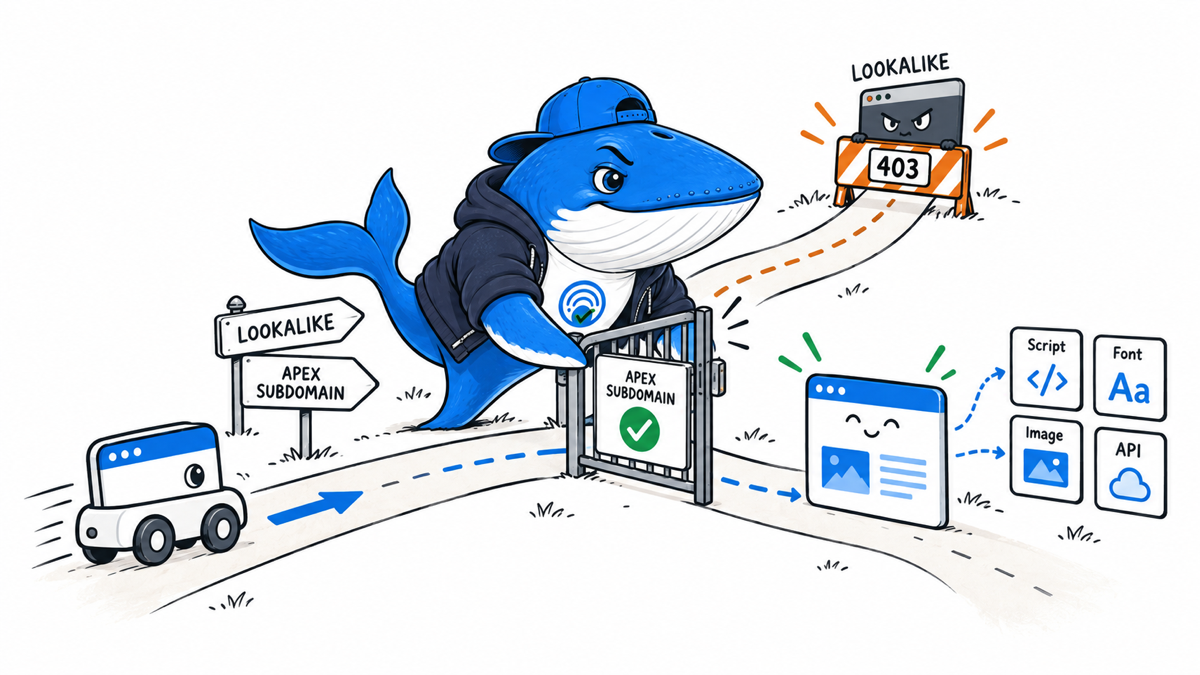
A browser automation can stay on the page you intended and still reach half a dozen other hosts. Fonts, scripts, analytics, APIs, images, and redirects all create outbound requests. Cloudflare Browser Run guardrails now let a session restrict those HTTP and HTTPS requests to an explicit hostname allowlist.
The dangerous configuration is not only an allowlist that is too broad. An allowlist that is too narrow can produce a screenshot that looks complete while an API call or redirect quietly failed. The useful test therefore records the main document and every dependency separately.
The contract that changes the session
Cloudflare documents guardrails for Browser Run sessions created with Puppeteer, Playwright, or Chrome DevTools Protocol. Quick Actions do not support them. The policy is supplied when a new session starts and remains fixed for that session.
| Configuration | Documented effect | Failure to avoid |
|---|---|---|
| Omit both allowlist properties | HTTP and HTTPS remain unrestricted | Assuming an omitted policy means deny by default |
allowedDomains: [] | Block all HTTP and HTTPS requests | Expecting external fonts, images, scripts, or APIs to load |
| Exact hostname | Allow only that hostname | Forgetting the apex or a required subdomain |
*.example.com | Allow subdomains, not the apex | Treating it as equivalent to example.com |
*example.com | Also match registerable lookalikes such as evilexample.com | Using a prefix wildcard as a safe subdomain rule |
| Hosted domain set | Reuse an HTTPS text list, cached for up to one hour | Expecting an edit to change an already running session |
The documented limits are 50 allowedDomains entries and four allowedDomainSets entries. A pattern contains a hostname only: no scheme, port, or path, and no more than one wildcard. Invalid policies are rejected with HTTP 400.
Use two entries for an apex and its subdomains
guardrails: {
  allowedDomains: [
    "example.com",
    "*.example.com"
  ]
}
This is deliberately more explicit than *example.com. Cloudflare warns that the prefix wildcard can match a hostname an attacker registers. The subdomain wildcard avoids that lookalike class, while the separate apex entry keeps the root host reachable.
Test the dependencies, not only page.goto()
A successful navigation does not prove that the page completed its work. Use a fixture with one request of each type that matters to the automation:
- An apex document and one subdomain document.
- A redirect whose destination uses another hostname.
- A third-party script, font, and image.
- A fetch or XHR request to an API hostname.
- A lookalike hostname that must be blocked.
- An inline page tested with the block-all policy.
For every request, save the requested hostname, final URL, resource type, status, error, and the two guardrail headers. Record whether the failure affected the main document, a visual dependency, or data that changes the page after load.
Download the Browser Run guardrail test matrix. The rows are marked EXAMPLE-REMOVE; they are a fixture, not claimed test results.
Verify a blocked response from three signals
const response = await page.goto("https://example.org");
const headers = response?.headers() ?? {};

const blocked =
  response?.status() === 403 &&
  headers["cf-mitigated"] === "guardrails" &&
  headers["cf-brapi-guardrails-reason"] === "not-in-allowlist";

if (!blocked) throw new Error("Unexpected guardrail outcome");
Cloudflare documents those three values together. Testing only for 403 can confuse a guardrail decision with an origin authorization failure, rate limit, or another policy. Preserve the headers before a retry changes the evidence.
Hosted lists add a cache boundary
A hosted domain set must use HTTPS, return text/plain, and place one hostname pattern on each line. Blank lines and lines starting with # are ignored. One invalid line rejects the list.
Cloudflare says a hosted list can be cached for up to one hour. An edit affects new sessions after the cache refresh, not a session that already started. A valid change test therefore creates a new session, records the list version and retrieval time, and checks inside and outside the one-hour window. Without those controls, an apparent stale-policy bug may simply be the documented cache.
Use Session Recordings to explain a failed run
Cloudflare’s September 18 update adds an Inspect panel to Browser Run Session Recordings. The Logs tab searches captured console output. The Network tab exposes each request’s method, status, headers, payload, response and timing waterfall, and can export the recorded activity as a HAR file. The DOM tab shows the reconstructed page structure at the end of the recording.
This closes an important gap in an allowlist test. A screenshot can look complete while a blocked API call removes dynamic data. With recording enabled, the request timeline can show the rejected hostname and the final DOM can show the consequence. For multi-tab sessions, inspect the tab that produced the failure instead of treating the recording as one combined page.
- Enable
recording: truewhen the session is launched; it cannot be added when reconnecting. - Capture the session ID before closing the browser.
- After the session closes, inspect console, network and final DOM for the affected tab.
- Export the HAR or retrieve network activity through the API and retain the target ID with it.
- Match a blocked request to the guardrail response headers and to the visible or DOM-level failure.
Session recording is opt-in and is not available for Quick Actions. Cloudflare says recordings are retained for 30 days, while input values are masked by default. DOM recording also cannot reproduce canvas pixels, cross-origin iframe contents, video, audio or WebGL output. Preserve a real screenshot when those surfaces matter.
Primary sources: Cloudflare’s Inspect panel changelog and Session recording documentation.
The release check I would use
- The intended main document loads from an allowed host.
- Every required redirect destination and dependency is declared.
- A deliberately disallowed host returns the documented guardrail signals.
- A lookalike hostname is blocked.
- The block-all case makes no external HTTP or HTTPS request.
- Puppeteer and Playwright results are reported separately; CDP remains untested unless it was run.
This article documents the product contract and provides a reproducible fixture. SearchEngineAnswer did not run Browser Run against a Cloudflare account for this release, so it does not claim observed parity across Puppeteer, Playwright, and CDP.
Primary documentation
Keep learning
Continue this topic
Next in this topic
Claude On-Demand Compaction Needs a Citation-Retention Test
Earlier in this topic
X Search Is Switching From Per-Call to Per-Result Pricing
Tools & Workflows
Ask a question or join the discussion